80% of enterprise software is running on SaaS. The majority of users access these from outside the corporate network. How can you troubleshoot poor SaaS performance to maintain their productivity and make sure your business processes keep running smoothly?
Let’s take a first look at what drives SaaS performance and then take a closer look at how you can run diagnostics that help you draw a path towards resolution.
The drivers of SaaS performance
The response time experienced by end users from SaaS platforms is driven by multiple infrastructure and application layers: endpoint, local network / WiFi, DNS, ISP, internet path, cloud secured gateways, 3P/CDNs, cloud platform and application response.
Endpoint health
The performance of the end user’s machine obviously has an impact on the response times perceived by the user in the sense that it will affect the sequence and speed of interaction with the different servers delivering the application (data, images, scripts, …), the rendering on the browser and the execution of the local javascripts.
To run properly, that machine will need sufficient resources (processor, memory, disk) for the browser to execute all these tasks efficiently.
The browser used to access the SaaS applications may also have an impact on the speed of rendering of the application to the user.
Local network and WiFi
The performance of the local network (from the location of each end user) materialized as the latency, packet loss and bandwidth available to the router may harm the performance of all web applications. WiFi coverage issues, poor quality LAN will negatively impact the experience of users, as it would impact all transactions strongly.
DNS (Domain Name System)
That system translates hostnames (or FQDN) into IP addresses so that the request can be routed to the adequate nodes.
DNS will affect SaaS performance in two ways:
- Resolution time: unless the DNS resolution has been performed and cached recently, translating a hostname into an IP address takes some time (making a request to a DNS server, waiting for the DNS processing to be performed and the response to be transferred back to the client). DNS has a huge impact in case of unavailability, on the other hand the DNS resolution time will affect SaaS performance in a limited way as it will only add delay when a new session is started and the DNS resolution is not found in cache.
- According to DNS service providers name servers locations and availability, DNS resolutions are performed based on a geolocation of users and used to redirect them to the closest host for each service. An error in geolocation can strongly affect response times by adding network latency to all interactions with the applications for both the server processing and the data transfer.
Network latency from the users to the SaaS platform
The time needed to send packets back and forth between the user and the servers will affect all steps in using the app: establishing a TCP session, setting up a secure TLS connection (see this article for more details on this), making requests to the server, and receiving server responses.
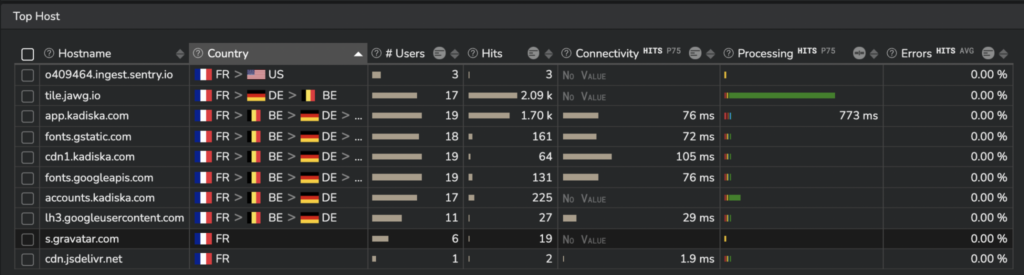
Network latency should be considered not only to the application root servers but also to all hosts involved in the delivery of the application (CDN, authentication servers, API, third-party services). To understand more about this topic, I recommend you take a look at this article.
Cloud gateways and proxy servers
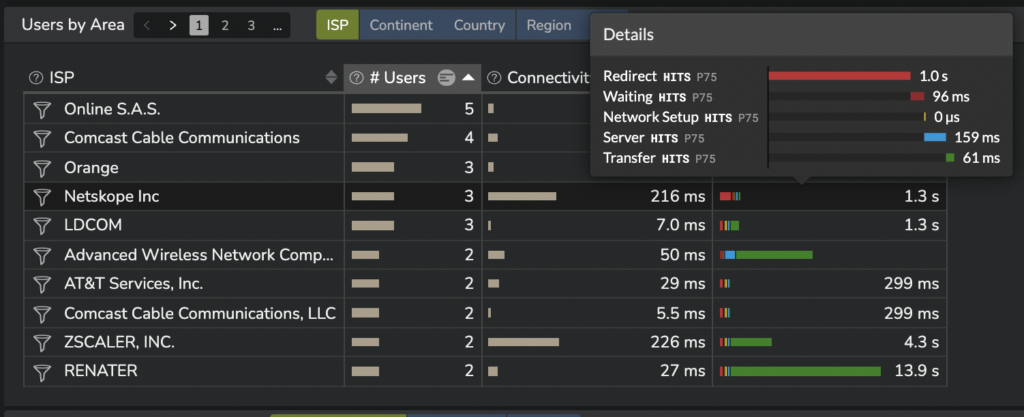
Most enterprise IT departments have taken measures to secure the access to their SaaS applications for work from home situations. They use a variety of cloud services ensuring authentication, access rights enforcement and proxification of SaaS traffic. Commonly used solutions are zScaler, Netskope, McAfee Mvision, Prisma of Palo Alto Networks…
CASBs and Secured Web Gateways impact SaaS performance in the following ways:
- These services add some additional delay by
- redirecting the traffic to their system, which increases network latency,
- requiring some time to do the security processing and then connecting to the SaaS applications.
- These services can also suffer from geolocation errors and redirect users to nodes which are far away from users.
Here is an illustration of the impact of cloud secured gateways:
Server layers
A SaaS platform is usually composed of a variety of hosts
- directly controlled by the SaaS providers
- hosted / provided by 3rd parties like CDN providers, cloud providers and 3rd party providers (like API, authentication services for example).
The response times for the requests processed by each server will depend on different layers:
TLS negotiation
Communications are encrypted as a standard and users connect to the SaaS services through TLS to ensure the integrity and confidentiality of the communications. The TLS termination can be performed by dedicated pieces of infrastructure or servers. The time needed to perform the setup of the secured session depends both on the network latency, the version of TLS used and the performance of the servers (and marginally the details of the TLS negotiation). Nevertheless, it only affects the performance once per session that needs to be established. To learn more about TLS implications on performance, please read this article.
Server processing and data transfer
Assuming we are considering modern applications, we should focus on Single Page Applications, which represent the majority of the SaaS applications. This means that the load of the initial bundle is anecdotal and most of the transactions affecting the user experience are API calls.
How to diagnose each type of SaaS performance issue?
The table hereunder lists the most common pain points when considering response times for SaaS applications and the free tools you can use to pinpoint them.
| Layer | Potential issue | Level of impact | Typical Diagnostic tool |
|---|---|---|---|
| Endpoint | CPU/RAM outage | High | System monitor |
| Endpoint | Browser error | High | Browser Devtools |
| Local network / WiFi | WiFi degradation | High | Network configuration Traceroute / ping |
| DNS | Slow DNS resolution | Low | Dig |
| DNS | Geolocation error | High | Browser Devtools; Traceroute / ping, geolocation database |
| Network latency | Poor ISP quality | High | Traceroute |
| Network latency | BGP path change | High | Traceroute |
| CASB / SWG | Slow processing | Medium | Browser Devtools |
| CASB / SWG | Geolocation error | High | Browser Devtools; Traceroute / ping, geolocation database |
| TLS | Slow TLS negotiation | Medium | Browser Devtools |
| Server processing | Slow initial content loading | Low | Browser Devtools |
| Server processing | Slow transactions | Variable | Browser Devtools |
| Server processing | Queueing and poor critical rendering path | Medium | Browser Devtools |
SaaS performance degradations: what to look for?
This diagram shows which metrics can reveal which kind of problem and which tool can help identify it.
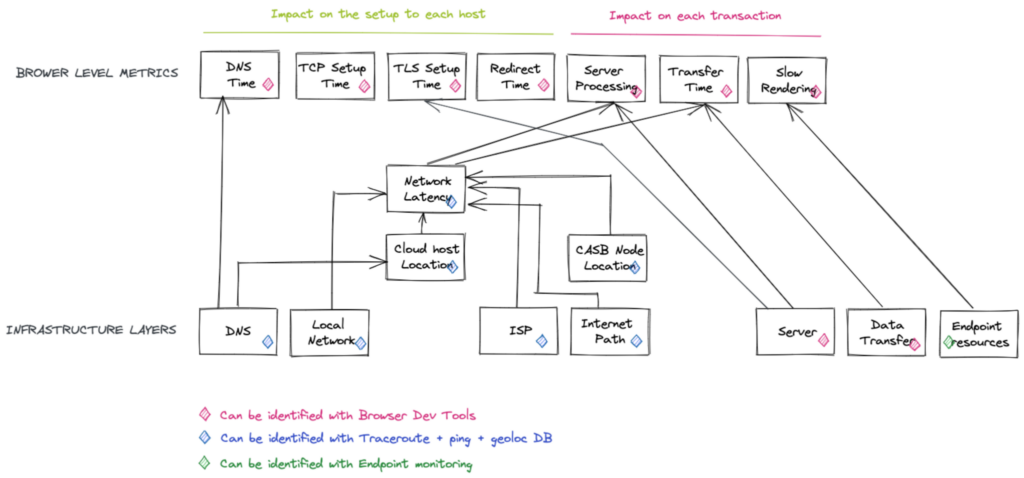
The key tools you will use to troubleshoot the issues affecting a user with poor SaaS performance will be:
Chrome Web Dev Tools
How to get Performance metrics for each hit out of Chrome Web DevTools
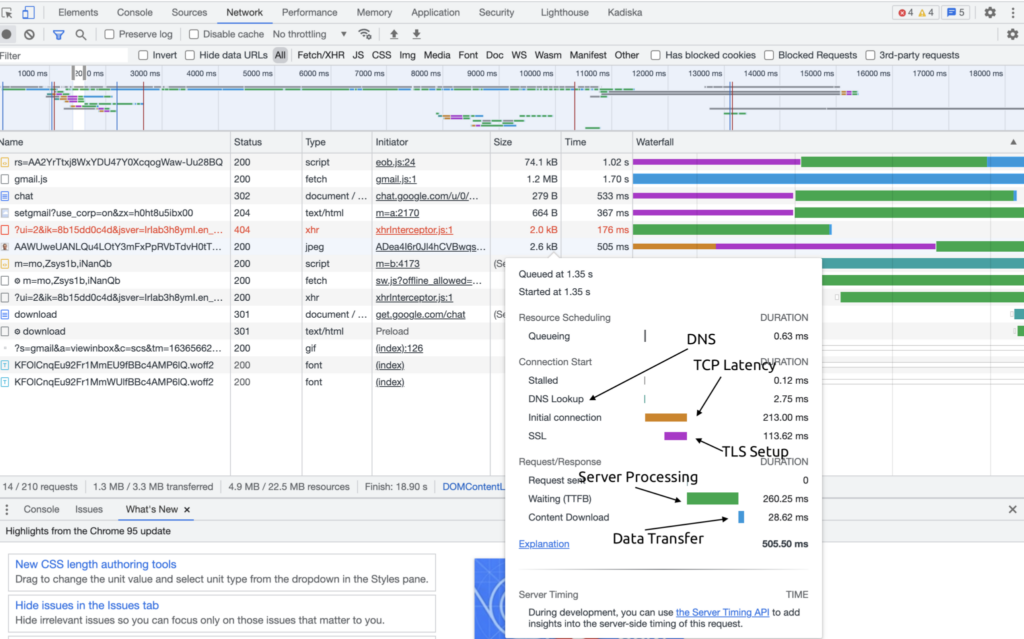
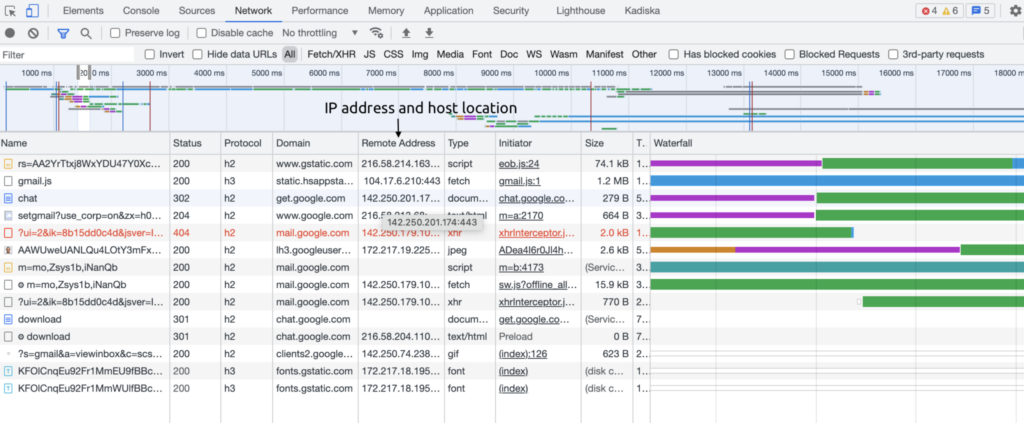
How to list the hosts and their respective IP addresses to locate your SaaS hosts
Traceroute
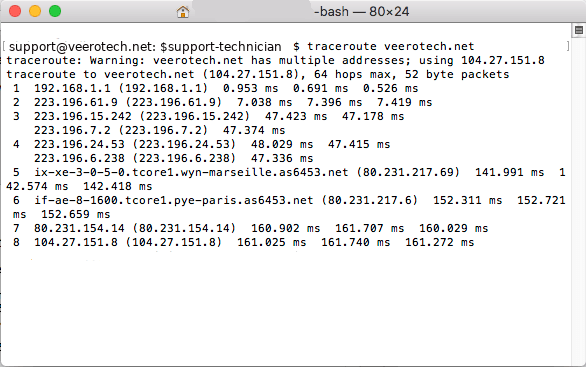
This tool present on all systems will help you understand the latency towards a host, the network path and where an eventual network outage is occuring.
Endpoint monitoring
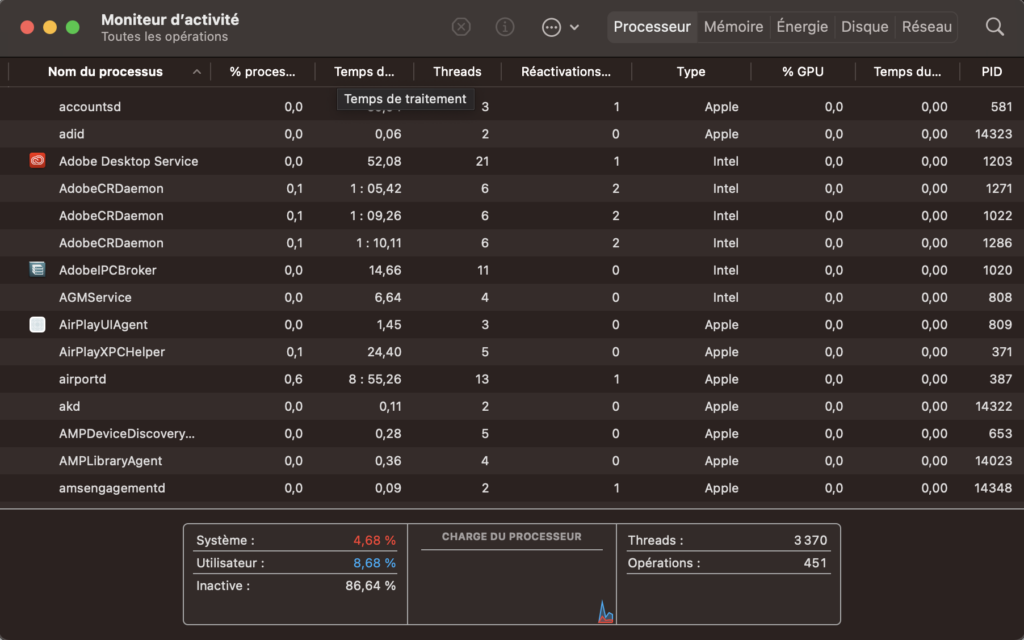
Every professional operating system offers a way to monitor system resources like CPU, RAM, disk access and network consumption.
Here is an example for Mac platforms.
How to make SaaS performance monitoring at scale and permanent?
Of course, all this data is available at a given point of time and for a single endpoint; it also requires a certain level of expertise.
If SaaS performance impacts the productivity of your business, you certainly want to monitor all your users, 7 days a week to become proactive, concentrate all the diagnostic data into a single solution to reduce resolution times and optimize your SaaS performance overall.
P-DEM proactively helps your teams deliver an amazing user experience while maximizing security and performance without compromise. Learn more on the Netskope P-DEM page.