Netskope Threat Labs recently posted the first entry in our leaky cloud app series about Google Calendar. In this edition, we will cover Google Groups. Misconfigurations in Google Groups can lead to unintended internal, external, and public exposure. Our research uncovered the exposure of confidential, internal, and sensitive data across hundreds of organizations through Google Groups. We also found a public group used as an email list for password resets, allowing anyone to view the user passwords.
This post details the common misconfigurations in Google Groups that lead to unintended data exposure and provides recommendations to lock down groups to prevent data leaks.
Google Groups
Google Groups provides discussion groups via a message board where people can hold conversations in the form of posted messages. A group can be configured to function as an email list, web forum, Q&A forum, or collaborative inbox.
Google Groups – Misconfiguration
When a user creates a group, the first step is to configure access control. The basic group permissions for a personal Google account are shown in Figure 1.
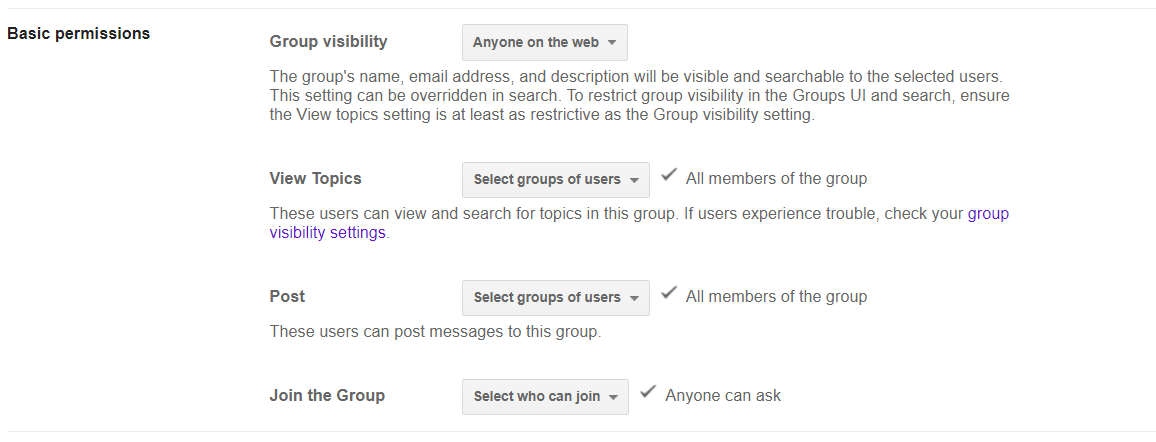
Figure 1: Personal Google group settings
The default group settings for a personal account are
- Group visibility → open to anyone on the web
- View topics → Select groups of users
- Post → Select groups of users
- Join the Group → Anyone can ask
The default “Group visibility” and “Join the group” permissions allow anyone on the web to see that the group exists and ask to join. The default “View topics” and “Post” permissions prevent anyone outside the group from viewing content or posting messages. The default settings do not expose any sensitive data. Instead, the exposures we discovered were the result of user misconfiguration, not overly permissive defaults. Figure 2 shows the worst kind of exposure we discovered: Anyone on the web can join, view, or post.
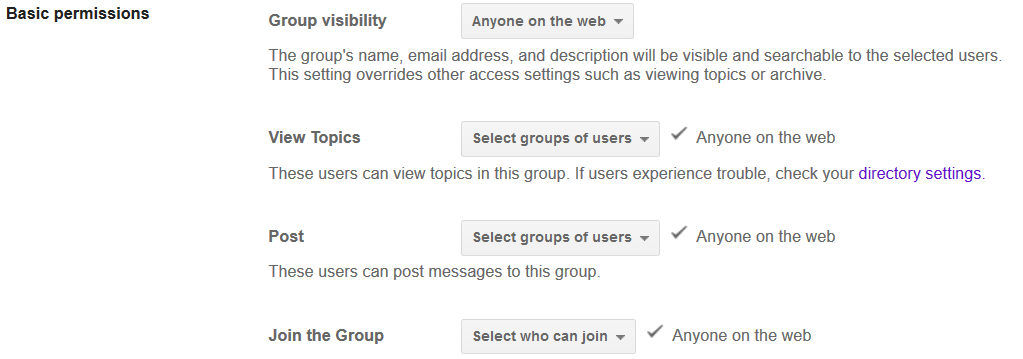
Figure 2: Group permissions set to Anyone on the web
Netskope Threat Labs discovered hundreds of groups with “Anyone on the web” settings that exposed confidential, internal, and sensitive data to the public Internet. In one example, we found a group of a popular online portal that was used as an email list for password generation/reset, where anyone on the web was allowed to view the topics as shown in Figure 3.
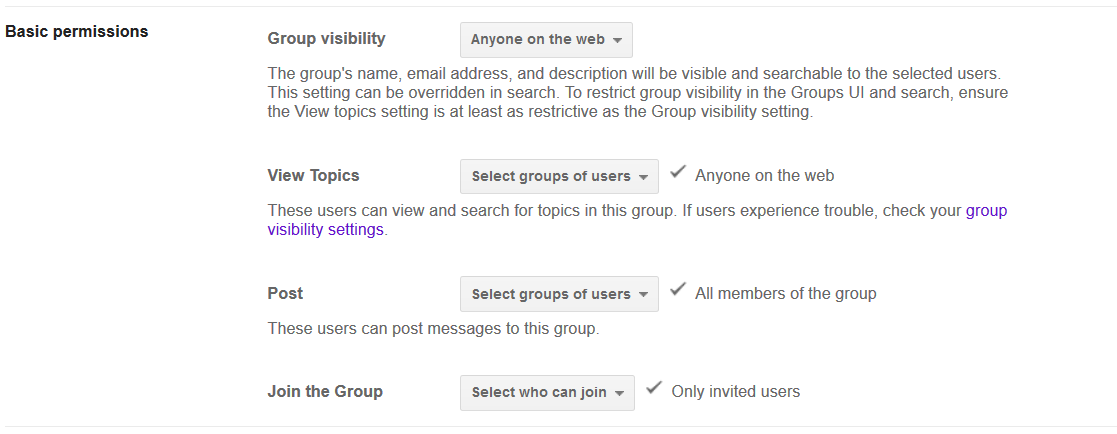
Figure 3: Group setting that allowed any on the web to view the post
The above setting allowed anyone to view the passwords, though they could not join the group. In another similar example, we found a facility management consultancy that allowed anyone to view the topics, exposing confidential information, including salary information and offer letters.
Data doesn’t necessarily have to be exposed to the public Internet to be considered “exposure.” Corporate groups with misconfigured permissions can also lead to internal or external exposure of confidential data. We identified one such misconfiguration of a group used for finance-related discussions with the settings described by Figure 4. This allowed everyone in the organization to view data that should have been kept confidential within the members of the group.
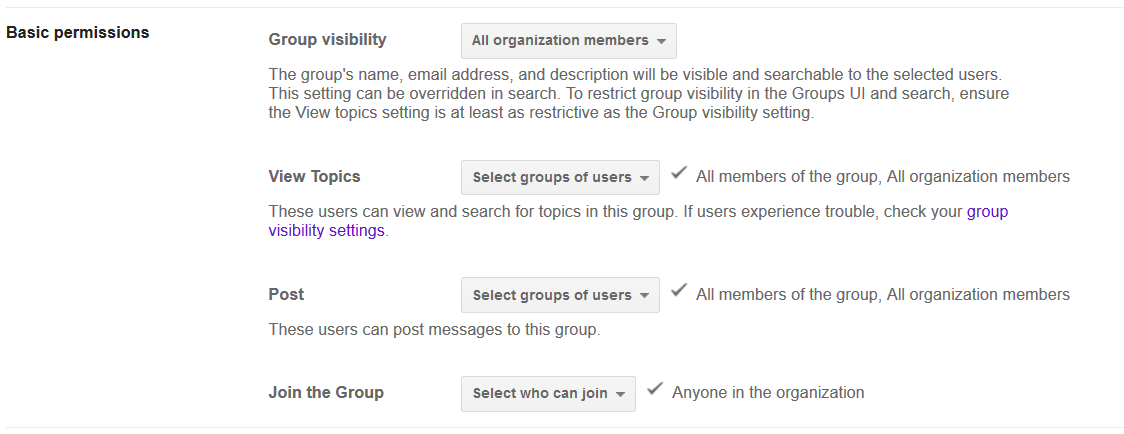
Figure 4: Group setting in an organisation’s group
To summarise, we identified several patterns in the settings that led to data exposure:
- Groups that allowed anyone on the web to join (without approval)
- Groups that allowed anyone on the web to view the topics
- Groups that allowed anyone on the web to post
- Groups that allowed anyone within the organization to view the topics
We discovered many different types of sensitive data exposures, including:
- Employee resumes
- Offer letters
- Salary details
- Employee background verification documents
- Travel itineraries
- Travel documents
- Bank statements
- Financial transactions
- Support tickets
- Passwords
- Company revenue details
- Source code
- License keys
- Meeting links
- Drivers licenses
- Passports
The groups that exposed the data were:
- Private, public, and government organizations
- HR, finance, and marketing departments
- Travel agencies
- Online portals
- Educational institutions
- Third-party consultancies
We reached out to the affected organizations to mitigate the exposures we discovered. In the course of these discussions we uncovered the following themes:
- Organizations were not actively auditing group settings
- Organizations did not have controls in place to prevent individuals from exposing groups
- Users weren’t being properly removed from groups when they left the organizations, namely because their personal emails had been added
Google Groups – Recommended Settings
For personal Google accounts, we recommend groups use the permissions shown in Figure 5. These are slightly more restrictive than the default permissions to prevent others from discovering the group or asking to join.
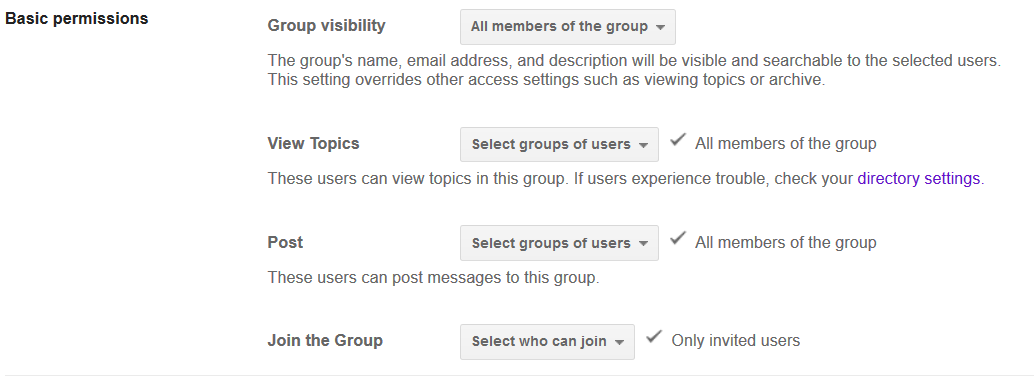
Figure 5: Recommended Google personal email group settings
For enterprise accounts, we recommend the permissions as shown in Figure 6. Enterprise accounts also enable administrators to enable group service restrictions. We recommend the following restrictions be put in place to prevent accidental exposure.
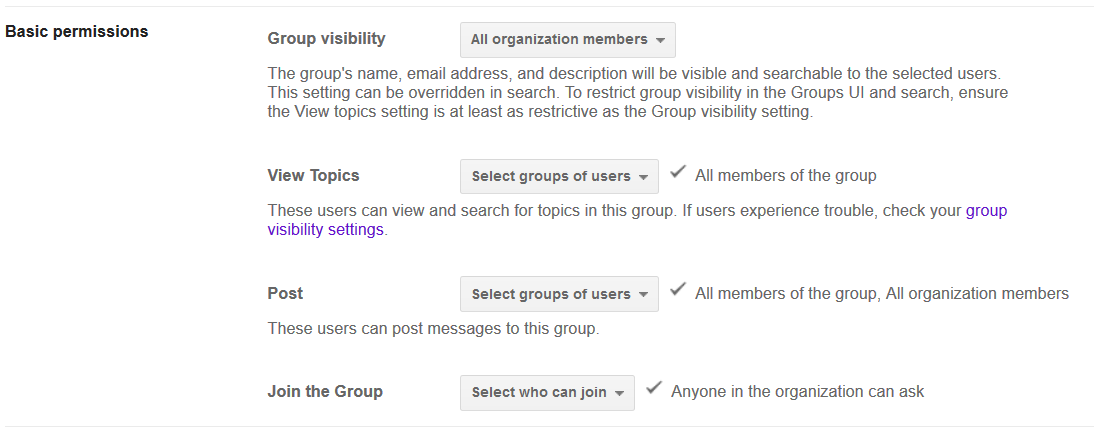
Figure 6: Recommended Google enterprise email group settings
Conclusion
This second edition of our leaky cloud apps series provided a detailed synopsis of how confidential information gets leaked through misconfigured Google Groups. In many of the cases we highlighted, adversaries could leverage the leaked information to gain access to additional data and infrastructure. They could also use the group to potentially spread malicious content if given join or post permissions. We recommend auditing group settings and restricting groups to our recommended settings to avoid accidental exposure. For more information about Google Groups, we recommend reading an article by Krebs on Security about public data exposure and Google post describing how to audit your own settings.
Stay tuned for our next edition, which will cover Google link sharing.