Did you know that the default link sharing option in Google Photos allows anyone with the link to view the files and all images shared in Google Hangouts that are publicly accessible? In this edition of our leaky app series, we will cover how image link sharing in Google Hangouts and Google Photos can lead to the accidental public exposure of sensitive data. We will also look at the threat detection capabilities of Google Photos and Google Hangouts. Whereas files uploaded to Google Drive are scanned for malicious content, no such scanning occurs in Photos or Hangouts.
This post is part of a series highlighting data exposure concerns in Google Calendar, Google Groups, Google link sharing, Zendesk, and O365 link sharing. We will highlight the exposure concerns, detection gaps in Google services, Netskope’s CTEP capability, and a method for data exfiltration.
Google Hangouts
In Google Hangouts, users can share images and videos alongside their chat conversations. Every image shared in Google Hangouts generates a public link, as shown in Figure 1.
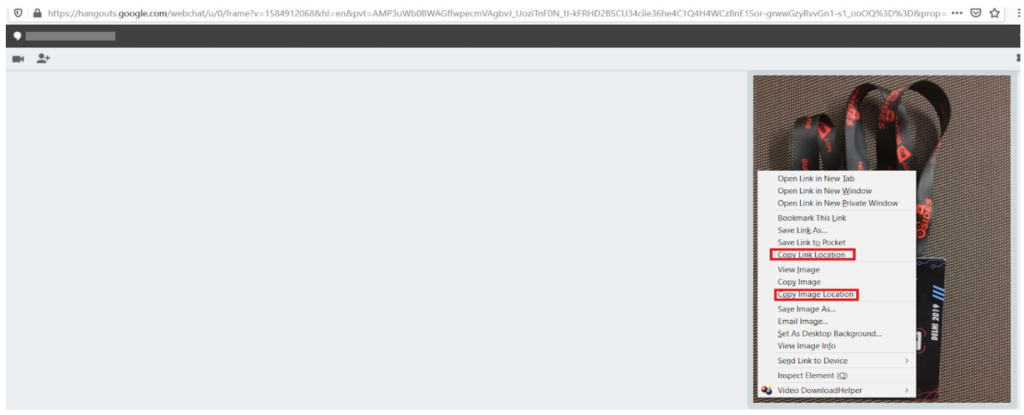
The generated link is accessible to anyone without any authentication. On top of this, the link remains valid indefinitely, unless the image is deleted from the Google Album Archive. Furthermore, this is true even of images uploaded when the “conversation history” is disabled. Even though the conversation itself is not retained, the images shared while the history is disabled are.
Google Photos
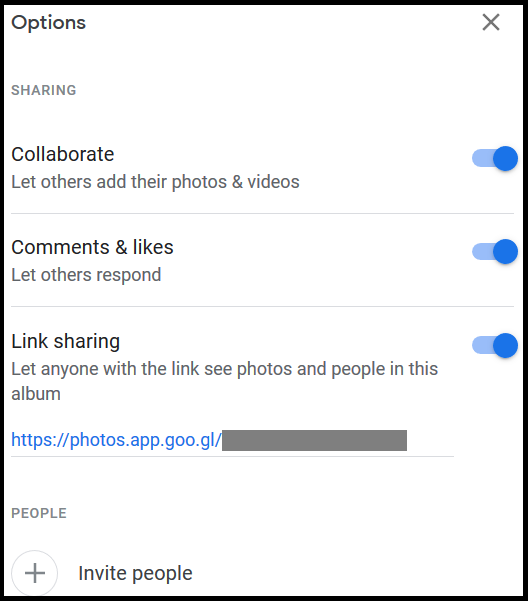
Alongside Google Hangouts, Google Photos also allows users to upload and share photos and videos. The photos and videos shared have the default permission to let anyone with the link to see the photos or albums as shown in Figure 2.
Google Photos also allows a user to share the photos to selected people, share via Facebook and Twitter, and copy links as shown in Figure 3.
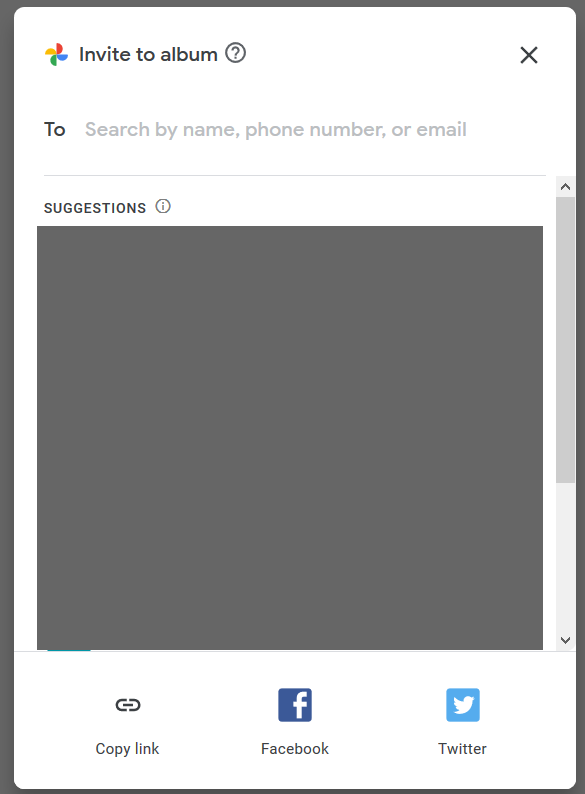
When you use “copy link” and share the link, you relinquish control over who can access your files—anyone who gets their hands on a link can access a file, whether you intended them to or not. We recommend sharing sensitive images only to specific users or uploading the files to Google Drive with restricted link sharing as an alternative to avoid accidental exposure.
Google Hangouts and Google Photos link sharing
The default link sharing settings in Google Hangouts and Google Photos can lead to accidental exposure of sensitive internal data to the public Internet. The links these services generate can be accessed by anyone and do not require authentication. Though this won’t make the data indexable by search engines, it can likely pose exposure concerns in the following ways:
- Anyone, inside or outside of your domain, with whom you didn’t intend to share the image, can access the image if they get their hands on the link.
- Users within your organization can continue to access the images after they leave.
To take it a step further, a malicious insider can share snapshots of private keys, passwords, tokens, or sensitive documents. Because these are public links, they can be downloaded by anyone at any time with little audit trail, making them a useful channel for data exfiltration.
When sharing sensitive content, we recommend restricting access to specific users in Google Photos to avoid accidental exposure. Users should not share sensitive information via Hangouts or via the “copy link” option in Google Photos. Any sensitive images already shared via Hangouts can be deleted from the Google Album Archive and any public links can be removed in Google Photos. Netskope customers can create DLP rules to detect sensitive images that contain x-rays, passports, and other sensitive information, to prevent them from being uploaded to such apps.
Threat detection in Google Hangouts and Google Photos
As Google Hangouts and Google Photos provide file hosting via public and unauthenticated links, they can potentially be used to spread malware. Techniques used by attackers to embed malicious content images without affecting their appearance include:
- Adding malicious iframes,
- Hiding malware Inside JPG EXIF headers,
- Embedding malicious executables to serve as next stage payloads, and
- Embedding data using steganography.
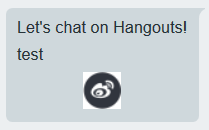
Google Photos and Google Hangouts do not contain any native threat detection capabilities. We tested this detection capability by uploading and sharing a variety of malicious image files. To our surprise, none of the malicious files were detected or blocked by either service. An example of a malicious gif file uploaded to Google Hangouts is shown in Figure 4.
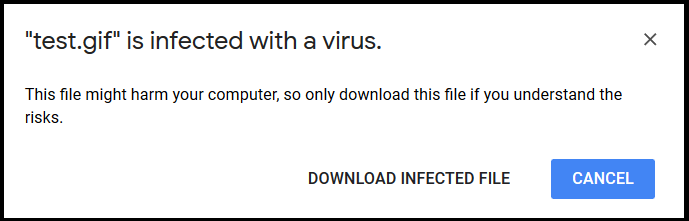
By comparison, the same files were detected by Google Drive. An example of one such alert is shown in Figure 5.
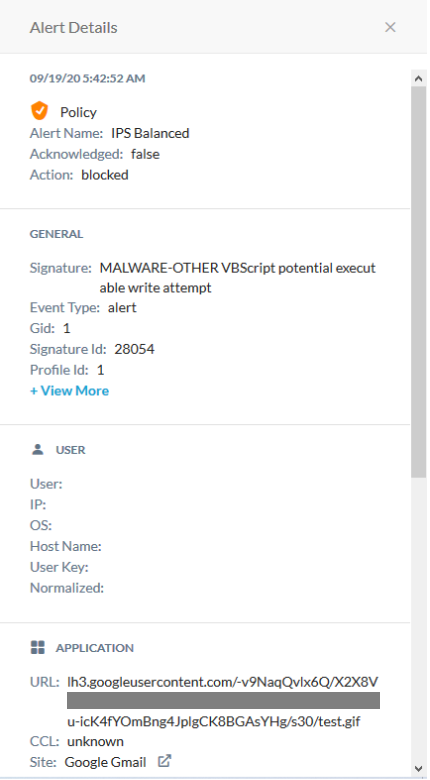
This clearly illustrates that the threat detection offered by Google varies from service-to-service. Netskope customers are protected from malicious content regardless of cloud app or service. An example of an alert generated by Netskope for the same image hosted in Google Hangouts is shown in Figure 6. Netskope CTEP detected the malicious embedded VB Script and blocked the image.
Conclusion
This edition of our leaky cloud apps series provided a detailed synopsis of how confidential information can get leaked through Google Hangouts and Google Photos leading to public exposure. The data can be copied, reused, and leveraged by adversaries and insiders to gain access to additional data and infrastructure. We recommend auditing link sharing options and restricting access to specific users in Google Photos to avoid accidental exposure. Users should not share sensitive images via Hangouts and/or via the “copy link” option in Google Photos.
Alongside the exposure concerns, we also detailed a detection gap in Google Photos and Hangouts, Netskope’s CTEP capability, and a method for data exfiltration. Cloud service providers have their own security controls, but they vary from service-to-service. Organizations need to have a threat protection service that works consistently across cloud apps to ensure they are fully protected. Netskope’s DLP and threat solutions detect sensitive images to prevent unwanted data exposure and provide comprehensive threat protection for all the cloud apps and services used by the enterprise.