This blog series expands upon a presentation given at DEF CON 29 on August 7, 2021.
In Part 1 of this series, we provided an overview of OAuth 2.0 and two of its authorization flows, the authorization code grant and the device authorization grant. In Part 2 of this series, we described how a phishing attack could be carried out by exploiting the device authorization grant flow.
Phishing attacks are starting to evolve from the old-school faking of login pages that harvest passwords to attacks that abuse widely-used identity systems such as Microsoft Azure Active Directory or Google Identity, both of which utilize the OAuth authorization protocol for granting permissions to third-party applications using your Microsoft or Google identity.
In the past few years, we have seen illicit grant attacks that use malicious OAuth applications created by attackers to trick a victim into granting the attacker wider permissions to the victim’s data or resources:
- Phishing Attack Hijacks Office 365 Accounts Using OAuth Apps, Lawrence Abrams, 12/10/2019.
- DEMONSTRATION – ILLICIT CONSENT GRANT ATTACK IN AZURE AD / OFFICE 365, Joosua Santasalo, 10/25/2018
Instead of creating fake logins/websites, illicit grant attacks use the actual OAuth authentication/authorization flows in order to obtain the OAuth session tokens. This has the advantage of bypassing MFA authentication, with permanent or nearly indefinite access since the OAuth tokens can be continually refreshed in most cases.
In this blog series, we will review how various quirks in the implementation of different OAuth authorization flows can make it easier for attackers to phish victims due to:
- Attackers not needing to create infrastructure (e.g., no fake domains, websites, or applications), leading to easier and more hidden attacks
- An ability to easily reuse client ids of existing applications, obfuscating attacker actions in audit logs
- The use of default permissions (scopes), granting broad privileges to the attacker
- A lack of approval (consent) dialogs shown to the user
- An ability to obtain new access tokens with broader privileges and access, opening up lateral movement among services/APIs
Finally, we will discuss what users can do today to protect themselves from these potential new attacks.
In Part 3 of this blog series, we will describe what security controls can be put in place to defend against these new attacks.
Security Controls
It is a challenge dealing with attacks targeting OAuth authorization flows, because:
- The OAuth protocol and authorization flows are complex and can be confusing
- Attacker techniques targeting OAuth itself are relatively new
- Once OAuth session tokens are hijacked, it is often difficult to detect and remediate due to factors described in previous blogs:
There are some controls that can be implemented to mitigate OAuth-related attacks, but each organization will need to evaluate the practicality and difficulty of implementation of the various controls.
- Prevention: Disallow device code flows. If at all possible, start with a policy that rules out all authorization using device code flows, as it will make detection and prevention controls easier.
The challenges will be enforcing this on unmanaged networks and devices such as remote workers at home or smartphone use. Additionally, some valid required tools use device code flows (discussed below in the Exceptions section). This may make this control difficult to achieve for many organizations, but should still be the starting point in your security plan.
- Prevention: Restrict application consent. Administrators can restrict whether or how users consent to applications. For example, normal users can be prevented from consenting to any applications.
This helps with illicit grant attacks but if a device code phish uses an existing application like Outlook that needs to be allowed, this is of limited use. Additionally, it may be burdensome and non-scaleable for administrators to approve all applications or it may be too restrictive to prevent users from approving any applications, in which case, explore which of the several options regarding user approvals fit your policies best.
- Prevention: Block URLs: The first approach to blocking new phishing attacks using device code flows will be to block as early as possible relevant URLs being used, which includes
- Device Code Login URLs that would be sent to the user include the following:
- https://www.microsoft.com/devicelogin
- https://login.microsoftonline.com/common/oauth2/deviceauth
- https://www.google.com/device
- https://accounts.google.com/o/oauth2/device/usercode
Notes:- There are two per vendor as they both employ a URL redirect from a short, convenient URL to the official device login URL.
- Numerous application protocols are used for phishing, so as many as possible should be covered, starting with SMTP (email). Corporate chat apps may be difficult to check inline, but detection/remediation can be done with authorized apps performing out-of-band checks on messages after they are posted.
- Device Code Generation URLs: To minimize malicious insiders generating phishing attacks using device code flows, one can also block the endpoints used to generate device and user codes:
- https://login.microsoftonline.com/common/oauth2/devicecode
- https://oauth2.googleapis.com/device/code
- Full path URL matching is required since the domains are official vendor domains. GET query parameters or POST parameters do not need to be checked. Detection and blocking/alerting on the above URLs can be effective.
The challenges are:- Phishes that are delivered over unmanaged channels (applications) such as mobile apps
- Exception apps (detailed below)
- Phishes that use the more common authorization code grant, since that flow is common and would be harder to block without losing critical user functionality. This includes illicit grant phishes.
- Device Code Login URLs that would be sent to the user include the following:
- Prevention: Exceptions: Any critical applications that must use device code flows need to be considered:
- SmartTV
If conference room or other office devices are allowed to connect to content such as video streaming, then the flows must be allowed. In this case, look at implementing very specific IP allow lists so that only a few devices with well-known IPs are allowed to initiate or respond to device flow authorizations. - Common applications that support device code flows e.g. Azure CLI.
The Azure CLI supports the more common authorization code grant flow as well as the device code flow when a local browser cannot be launched. If the latter case is common, then you will need to allow device code flows. This could make it much harder to set up IP allow lists, as the potential number of IPs may be larger and more dynamic than the SmartTV case.
- SmartTV
- Detection: Since OAuth access tokens are often the common authorization method used by many REST APIs, any actions are typically logged as the user’s actions if supported by the application e.g. API calls can be logged in Azure logging or GCP Stackdriver logging.
However, other OAuth actions are not typically logged, such as refresh tokens being used to refresh a new access token. And authorization flows are usually not logged in any detail. Here is an entry from the Azure sign-in logs for the victim of the phish: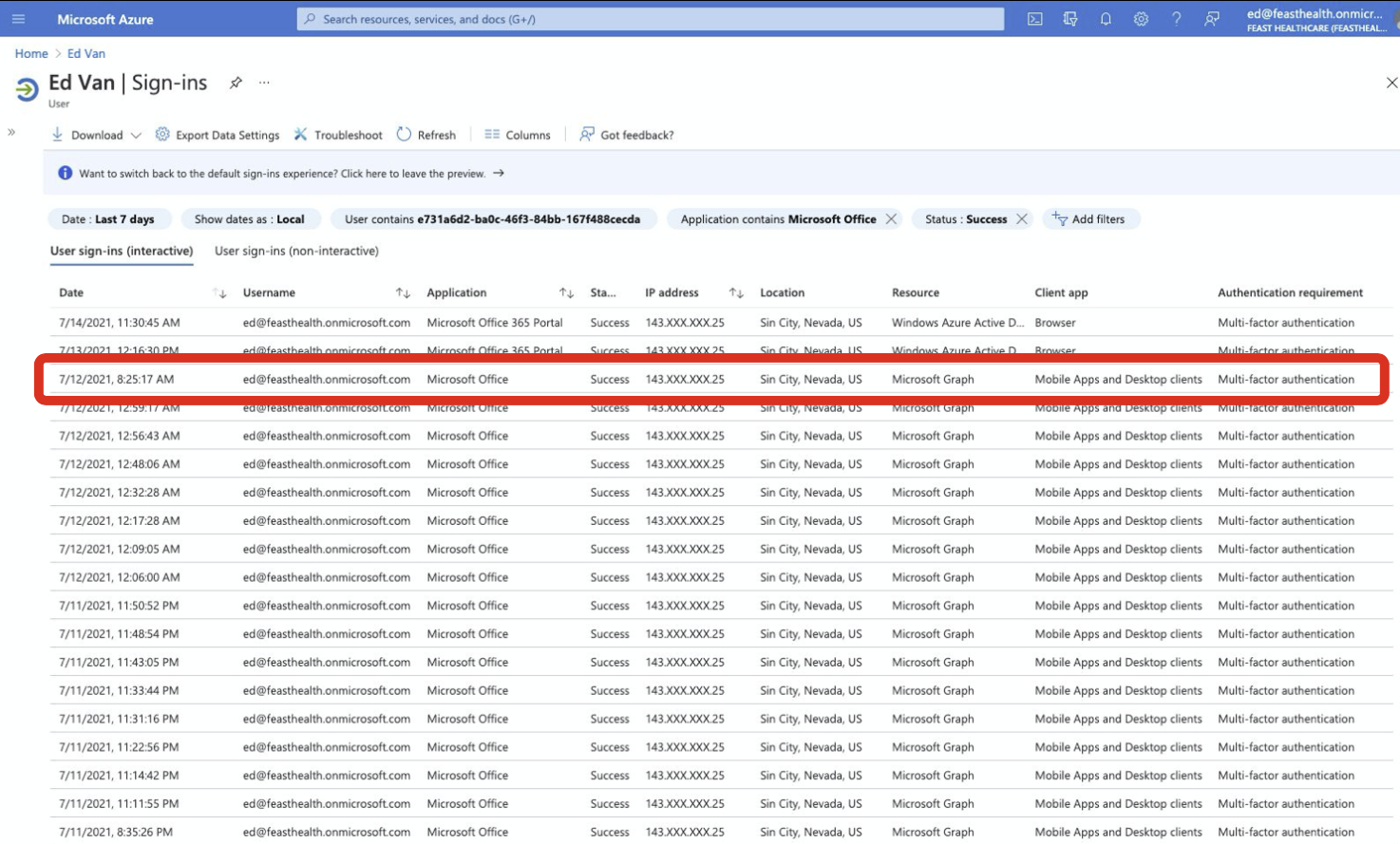
The IP address of where the attacker script is run is available, but the lateral movement to get a new access token for Azure is not logged. This limited logging poses a challenge to identify the attacker techniques described in this blog.
However, here are some controls that can provide more visibility on suspicious activity:- Use conditional access policies to enforce IP allow lists or allow only authorized devices
- Monitor Azure logs for any attempted API calls that fail due to the conditional access policies
- Monitor Azure sign-in audit logs for suspicious activity, such as IP addresses that do not match the IP allow lists
- Leading behavioral detection and analytics (UEBA) solutions should be evaluated and used. Typically machine-learning based, these approaches are important to detecting anomalous or suspicious activity.
- Mitigation: If compromised tokens are suspected, it may be unclear whether they were hijacked directly or if obtained because the primary credentials (username and password) were compromised. The safest remediation procedures should include:
- Restoring the compromised environment to a known, clean state (possibly restore from known backup to ensure no backdoors)
- Changing of primary credentials to prevent future access and abuse
- Revoking of all current session tokens (both access and refresh tokens) to ensure current access by the attacker is revoked.
- In Azure, refresh tokens can be invalidated with the Powershell cmdlet: Revoke-AzureADUserAllRefreshToken, but there is no current way to revoke access tokens.
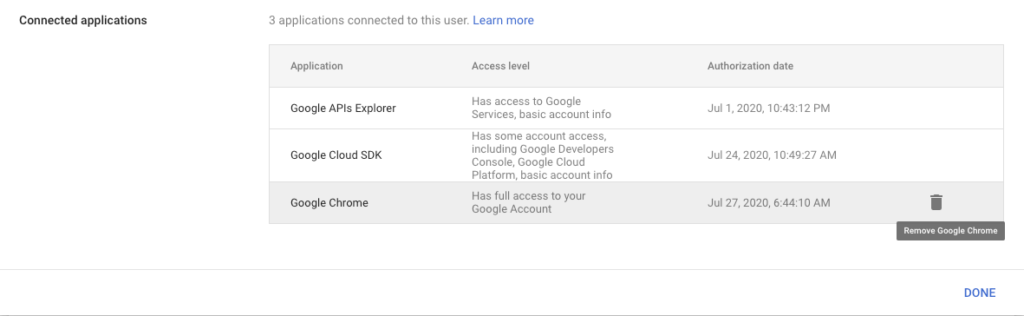
- In Google, deleting the OAuth connected application from Google Workspace will delete all access and refresh tokens for that application: Users > user > Security > Connected applications:
Conclusion
OAuth 2.0 has brought a lot of benefits in terms of secure authentication and authorization among Internet-enabled applications/devices and end-users. However, as is the case with most protocols, there is a level of complexity that can also open the door to abuse by attackers.
With OAuth, some of the complexity derives from the number and richness of the protocol and the number of different use cases.
We’ve shown and discussed how the device code grant flow and one implementation of it allows attackers to more easily phish victims, taking advantage of several aspects:
- Reuse of existing application client ids to provide more obfuscation of attacker actions
- Weak application authentication allowing easy reuse of existing applications
- Default scopes/permissions that grant wider initial privileges to the attacker
- Lack of consent dialogs for end users, making it confusing about what permissions have been granted to the application (attacker)
- Ability to easily move laterally to other API services and permissions
Some of the key differences between the device code flow and the more common authorization code grant flow that create opportunities for new attacks include:
| Functional Area | Authorization Code Grant | Device Authorization Grant |
|---|---|---|
| Authorization code or device code | Returned by authorization server via user redirect, dependencies on redirect mechanism/user | Device code generated upfront by application, attacker in control, no dependencies on redirect/user, no complications from inserting into OAuth handshake |
| Access tokens | REST API call with authorization code. Client secret and registered application redirect URL typically required for application authentication. | Polling model to directly retrieve OAuth access tokens. The attacker does not need server infrastructure. No dependencies on redirect/user. Weak authentication of device. |
| Consent | Explicit consent dialogs presented to users with scopes listed. | Typically, no detailed consent dialogs are presented to the user. In some cases, a simple "approve login" message is shown. Scopes not listed. |
Finally, we’ve covered some of the controls that can be implemented to assist in prevention, detection, and mitigation, namely:
- Blocking of the common login or device code URLs
- Policies that enforce IP allow lists or other device checks to ensure that only approved or expected applications and locations are allowed to participate in device code flows
- Detecting suspicious events in the sign-in or OAuth application logs
- Being clear on how to recover from compromised session tokens, especially when revoking session token access (Azure APIs to revoke OAuth session tokens and Google deletion of OAuth applications).
In future blogs, we’ll discuss attacks that exploit other OAuth authentication flows, more differences between OAuth vendor implementations, additional security controls, and open source tools we’ve released that can help you assess your exposure to some of these new phishing attacks.