Netskope Threat Research Labs posted an article in February detailing a growing trend in PDF decoys, which consists of using a “default allow” policy that uses cloud storage services to infect user devices with an infamous Remote Administration Tool (RAT) named Nanocore. The malware was delivered from Dropbox using a RAR compressed archive with UUE extension. Recently, we observed the malicious actors updated the extension name to .r11 using annotations in PDF decoys. The malicious payload resident in the Dropbox cloud storage service as well as an attempt to download them is detected by Netskope Threat Protection as Backdoor.Generckd.5034232.
The PDF decoys are traditionally sent as email attachments to users at various enterprises. In a number of enterprises, email attachments are often automatically synced to cloud storage services using file collaboration settings in popular SaaS applications and third party applications. Since the filenames appear less suspicious, they are more likely to be viewed as coming from within the organization (and therefore trusted) and shared with others in the same user group thereby resulting in a CloudPhishing fanout effect.
R11 file extension
After the initial discovery in February, we continued to see frequent usage of the .uue file extension in Dropbox. We closely worked with Dropbox to take down the URLs hosting the .uue extension malicious payloads. Similar to the .UUE file format, traditional compression tools like WinRAR and WinZip also support the decompression of the .r11 file format. A list of programs that can open files with .r11 extension can be found here. Since the payload is a malicious .RAR compressed archive with a .r11 extension, they end up successfully detonating, when the victim inadvertently executes the file. The usage of the .r11 file extension could be another attempt from the attackers to bypass network security devices.
PDF decoy downloading Nanocore RAT with R11 extension
The PDF decoy we observed posed as a document related to Rhenus Maritime Services. Upon opening the PDF decoy and clicking anywhere in the document, a RAR compressed archive, named “Rhenus Maritime Services.r11” is downloaded from Dropbox to the victim’s machine. Rhenus Maritime Services.r11 contained an executable file called “Rhenus Maritime Services.exe” as shown in Figure 1.

Figure 1: Rhenus Maritime Services.r11 RAR compressed archive
The activity illustrating the delivery mechanism is shown in Figure 2.
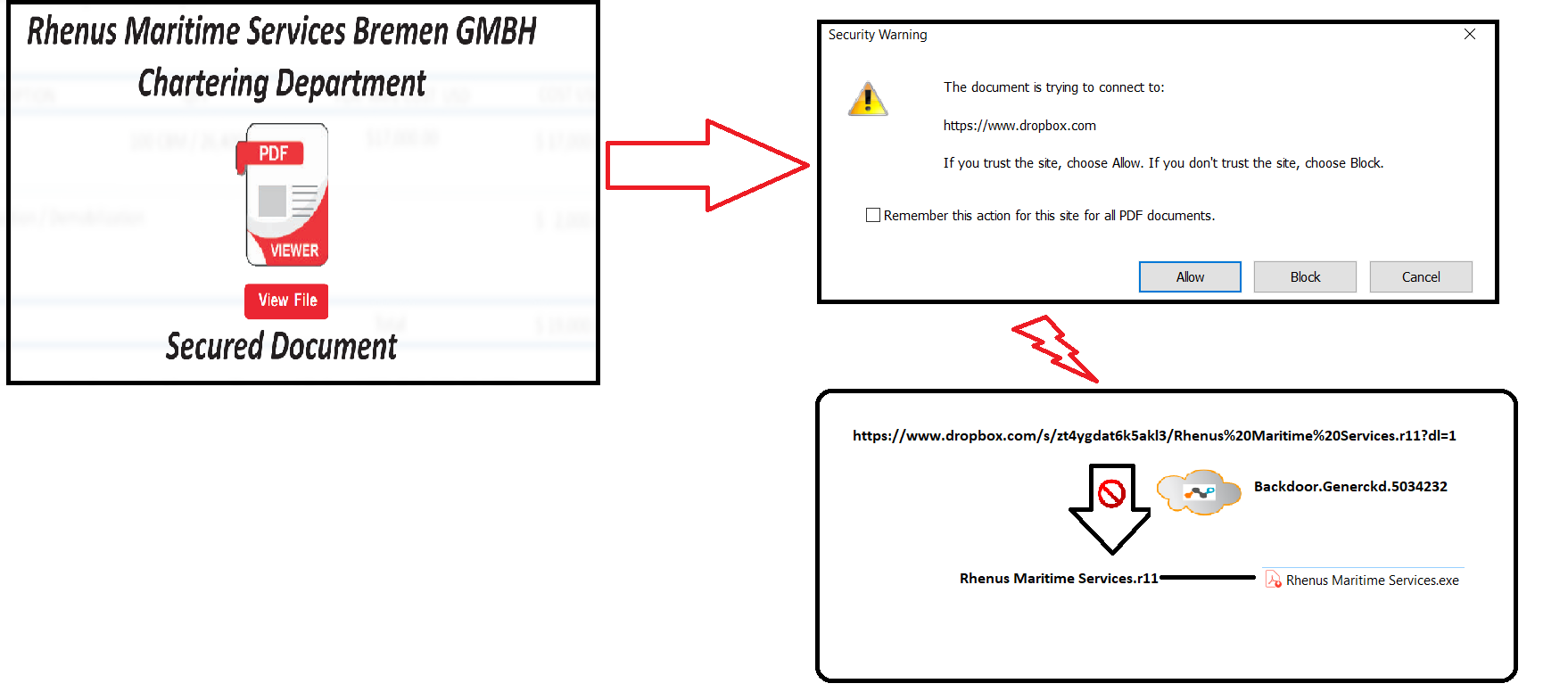
Figure 2: Delivery Mechanism of the PDF decoy
We also found that the PDF decoy was annotated using the RAD PDF annotator, as shown in Figure 3.
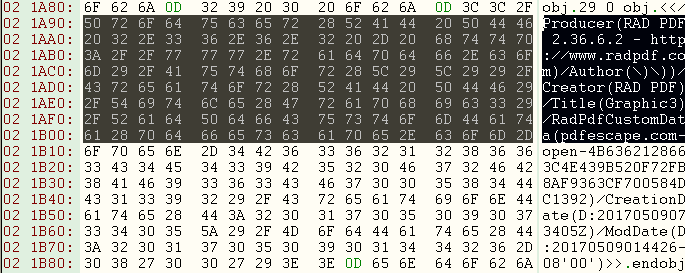
Figure 3: RAD PDF annotator
At the time of writing, we did not see any additional links used in the annotations. Nevertheless, the usage of RAD PDF annotator indicates that the attackers plan to reuse the Rhenus Maritime Services template by annotating new links when the URL is taken down by a cloud storage provider. As expected, when we reported to Dropbox and had the URL taken down, the malware author annotated the PDF decoy with a new Dropbox link as shown in Figure 4.

Figure 4: Annotation used in the PDF decoy
The payload which used the same file name with a different file hash is detected by Netskope Threat protection as Backdoor.Agnt.OR. The NanocoreRAT binaries which are compiled with AutoIT, exhibit similar behavior that we have already documented in our previous blog. On execution, the malware contacted the C&C 212.83.167[.]116. At the time of this writing, we did not observe any activity in the C&C. Virustotal passive DNS showed that the IP resolved to several dynamic DNS domains as shown in Figure 5.
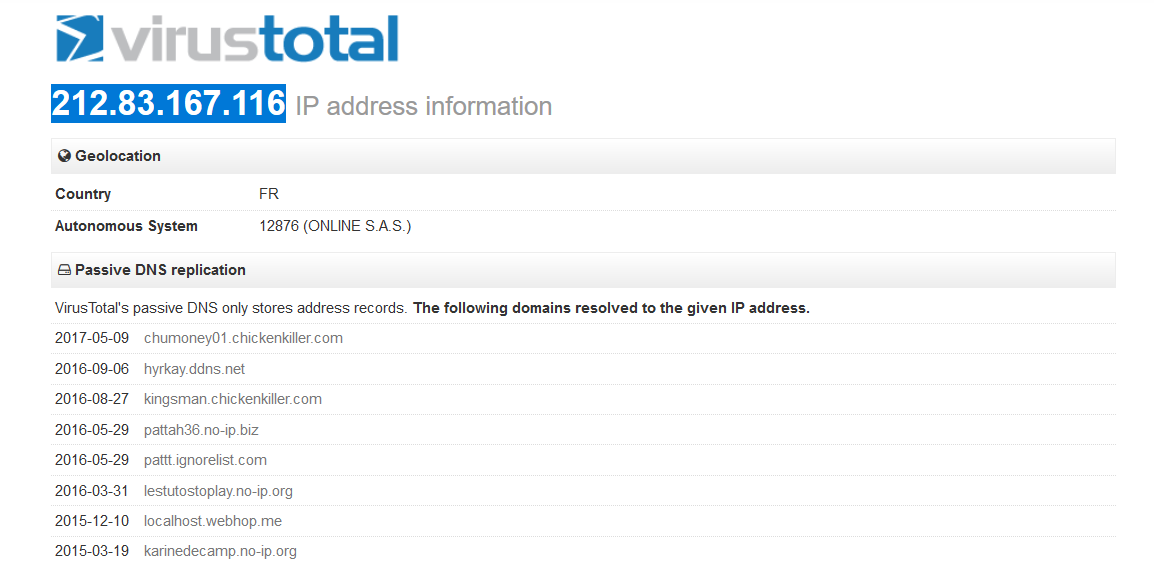
Figure 5: Domains resolved by 212.83.167[.]116 in VirusTotal
Conclusion
The PDF decoys using annotations have showcased the use of cloud as a threat propagation vector and a medium of a CloudPhishing fanout effect from a corporate environment. The usage of cloud services makes phishing threats look legitimate, as the victim is directed to the SSL server hosting the malware. As enterprises are rapidly adopting the use of Cloud and Cloud services, the need of a threat-aware solution and defensive mechanism for SSL inspection is required. Netskope has worked with Dropbox to take down the URL’s hosting the malicious payload with r11 extension. We will continue to closely monitor the developments of the PDF decoys using cloud storage services and update our findings with more interesting developments.
General Recommendations
Netskope recommends the following to combat cloud malware and threats:
- Detect and remediate cloud threats using a threat-aware CASB like Netskope and enforce policy on usage of unsanctioned services as well as unsanctioned instances of sanctioned cloud services
- Sample policies to enforce:
- Scan all uploads from unmanaged devices to sanctioned cloud applications for malware
- Scan all uploads from remote devices to sanctioned cloud applications for malware
- Scan all downloads from unsanctioned cloud applications for malware
- Scan all downloads from unsanctioned instances of sanctioned cloud applications for malware
- Enforce quarantine/block actions on malware detection to reduce user impact
- Block unsanctioned instances of sanctioned/well known cloud apps, to prevent attackers from exploiting user trust in cloud. While this seems a little restrictive, it significantly reduces the risk of malware infiltration attempts via cloud
- Enforce DLP policies to control files and data en route to or from your corporate environment
- Regularly back up and turn on versioning for critical content in cloud services
- Enable the “View known file extensions” option on Windows machines
- Warn users to avoid executing unsigned macros and macros from an untrusted source, unless they are very sure that they are benign
- Users should uncheck the option “Remember this action for this site for all PDF documents” in the PDF reader software
- Whenever you receive a hyperlink, hover the mouse over it to ensure it’s legitimate
- Users should actively track URL links added to the “Always Allow” list in PDF reader software
- Warn users to avoid executing any file unless they are very sure that they are benign
- Warn users against opening untrusted attachments, regardless of their extensions or filenames
- Keep systems and antivirus updated with the latest releases and patches